
Download our recovery and repair disk for Microsoft Windows Vista (also available for Windows 7, 8, XP, 10, 11 or Windows Server editions) that can be used to access system recovery tools, giving you options of using an antivirus, System Restore, document and picture backup and recovery, automated system repair, and a command-line prompt for manual advanced recovery.
Download recovery disk for Windows Vista
Looking for recovery disks for other Windows versions?
- Download Windows 7 recovery disk
- Download Windows 8 (and 8.1) recovery disk
- Download Windows XP recovery disk
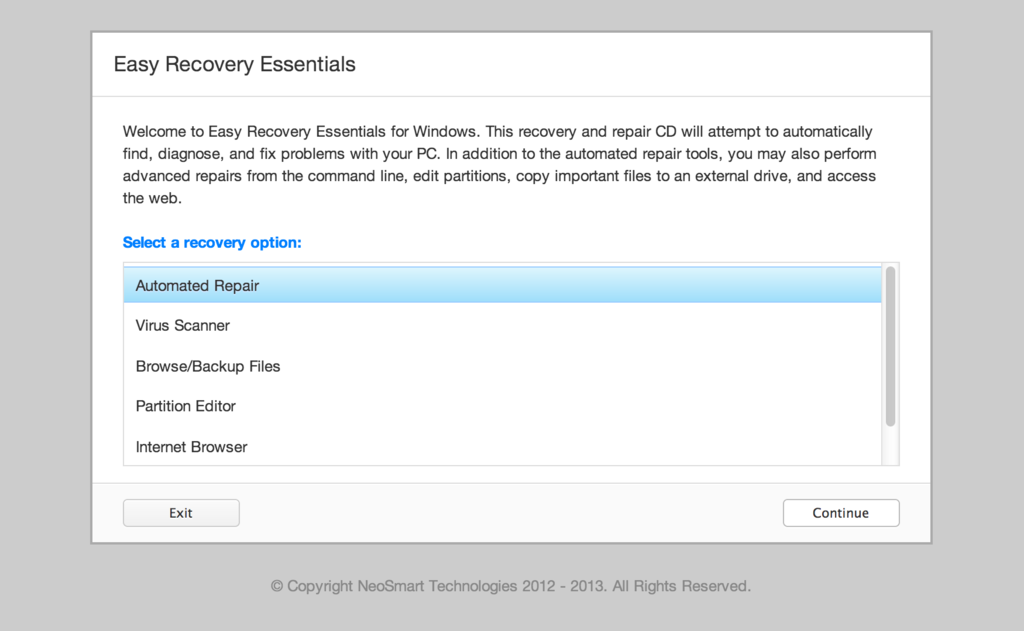
Easy Recovery Essentials (or EasyRE) is a 55 to 135 MiB download image ready to be burned directly to a CD, DVD or a USB stick.
Features of Easy Recovery Essentials include:
- Automatically find and fix errors
- Works even when you can’t get into Windows
- Recover from virus infections
- Restore your PC to a working state
- Access and back up your important data
- Use your PC even when it doesn’t work
- Advanced tools for IT experts
Contents
Disk for recovery & repair
If you’re like most PC users, you probably got Windows Vista with a new PC or laptop. And if you’re like 99% of the population, you get your new machines from one of the major manufacturers.
Dell, Acer, HP, Toshiba, Lenovo, they all have one thing in common: they don’t give you a real Windows Vista installation disk with your purchase.
Instead, they bundle what they call a “recovery disk” (that’s if you’re lucky – otherwise you’ll have a recovery partition instead) with your machine and leave it at that.
It doesn’t matter that you just paid a thousand dollars for a machine that comes with a valid Windows Vista license – your computer manufacturer just don’t want to spend the money (or perhaps take on the responsibility) of giving you a Windows Vista installation DVD to accompany your expensive purchase.
The problem is, with Windows Vista, the installation media serves more than one purpose. It’s not just a way to get Windows installed, it’s also the only way of recovering a borked installation.
The DVD has a “recovery center” that provides you with the option of recovering your system via automated recovery (searches for problems and attempts to fix them automatically), rolling-back to a system restore point, recovering a full PC backup, or accessing a command-line recovery console for advanced recovery purposes.
Download recovery disk for Windows Vista
 Easy Recovery Essentials repair process is non-destructive, recovering PCs without formatting or reinstalling Windows.
The powerful repair process can fix many issues that Microsoft’s own Startup Repair cannot. In addition to the industry-leading automated repair features, this disk will give you access to the following:
- System Restore
- Web Browser
- Partition Editor
- Antivirus Scanner
- Data/File Backup and Recovery
- Commandline/Terminal Access
Later update: Please note that this download is no longer free, due to licensing restrictions imposed upon us.
Download Easy Recovery Essentials for Windows Vista
Our recovery disk supports x86 and x64 platforms and all Windows Vista versions, including 32-bit and 64-bit editions:
- Windows Vista Ultimate (32-bit and 64-bit editions)
- Windows Vista Enterprise (32-bit and 64-bit editions)
- Windows Vista Business (32-bit and 64-bit editions)
- Windows Vista Home Premium (32-bit and 64-bit editions)
- Windows Vista Home Basic (32-bit and 64-bit editions)
- Windows Vista Starter (32-bit edition)
And all Service Packs:
- Windows Vista Service Pack 1 (SP1)
- Windows Vista Service Pack 2 (SP2)
This disk is a 120 MiB download in standard ISO format that you’ll need to burn to a CD or DVD before you can use it as a bootable recovery medium. You can also burn it on a USB stick.
You cannot use a recovery or repair disk to install or reinstall Windows Vista.
Burn to CDs, DVDs or USB sticks
NeoSmart Technologies has published a guide on how to burn an ISO image to CD or DVD with your favorite burning program, which you can read if you need more information or help on this topic. You can burnt it with ImgBurn, Alcohol 120% or ActiveISO:
You can also burn it on a USB stick if you don’t want to use CDs or DVDs. We published a guide on making a EasyRE recovery USB.
Compatible with PC manufacturers
This recovery and repair disk is compatible with desktops, workstations, laptops, notebooks, netbooks, ultrabooks and servers from major PC manufacturers, like Dell, HP, Asus, Acer or Lenovo plus more.
Dell, HP, Asus, Acer
Dell
The disk is compatible with all Dell laptops and desktop computers, including all its manufactured series like Adamo, Inspiron, Studio, Vostro, XPS, Latitude.
Do you have a Dell computer running Windows Vista? Read our Dell recovery and restore guide.
HP
The disk is compatible with HP computers: ENVY, EliteBook, Essential Home, Pavilion and x2 for laptops and ENVY, Essential Home and Pavilion for desktops and All-in-One Desktop PCs.
Do you have a HP computer running Windows Vista? Read our HP recovery and restore guide.
Asus
It’s compatible with notebooks, ultrabooks, laptops and desktops from ASUS.
It works for any computer that was manufactured by ASUS, if it runs Windows XP, Vista, 7, 8 or any of the following Windows Server editions: 2003, 2008, 2012.
Do you have an Asus computer running Windows Vista? Read our Asus recovery and restore guide.
Acer
It’s compatible with any Acer computer that has Windows installed, including these manufactured series:
- Aspire R, Aspire V3 and Aspire E for notebooks
- Aspire S7, Aspire S5, Aspire S3, Aspire P, Aspire M, Aspire V7, Aspire V5 for ultra-thin computers
- Aspire One for netbooks
- Aspire M and T, Aspire X and Predator G for desktops
Do you have an Acer computer running Windows Vista? Read our Acer recovery and restore guide.
Lenovo, Toshiba, Samsung
Lenovo
You can download the repair disk for any Lenovo computers, such as:
- ThinkPad, IdeaPad, Essential series for laptops
- Thinkcentre, Ideacentre and Essentials series for desktop PCs
Do you have a Lenovo computer running Windows Vista? Read our Lenovo recovery and restore guide.
Toshiba
It’s compatible with any Toshiba computers running Windows:
- Satellite, Qosmio, Portege, Tecra, Kira family series
- All-in-One desktop series
Do you have a Toshiba computer running Windows Vista? Read our Toshiba recovery and restore guide.
Samsung
The disk is compatible with Samsung line of laptops and desktops, including:
- ATIV Book, Gaming and Business PC series for laptops
- ATIV One for All-in-One desktops
IBM, Compaq, Gateway, eMachines
IBM
IBM personal computer business division was acquired by Lenovo in 2005.
This disk supports IBM desktop and laptop models, most notably the ThinkPad line.
Compaq
Compaq was acquired by HP in 2002, but some of its famous PC line series are still used by our customers.
Our disk works with Compaq notebooks and desktops PCs, including Compaq Presario series.
Gateway
Gateway Computer was acquired by Acer in 2007.
Our disk is compatible with Gateway Computers netbooks, notebooks and desktops PCs, such as:
- Series SX, DX and One ZX for desktop systems
- NE and NV series for notebooks
- LT series for netbooks
Do you have a Gateway computer running Windows Vista? Read our Gateway recovery and restore guide.
eMachines
eMachines PCs were manufactured up until 2004 when Gateway Computers brought the company. Gateway Computers was later acquired by Acer in 2007, but the eMachines PC brand was used until 2012.
If you own a computer from this computer brand, our disk is compatible with eMachines PCs.
Disk for Windows 7, 8, XP or Server editions
Windows 7
You can get our recovery disk for Windows 7. It supports all versions: Ultimate, Enterprise, Professional, Home Premium, Home Basic and Starter.
Windows 8
You can also get the recovery disk for Windows 8.
Windows XP
Easy Recovery Essentials is available for Windows XP users and it supports all Service Packs: Service Pack 1 (SP1), Service Pack 2 (SP2) and Service Pack 3 (SP3).
Windows Server 2003, 2008, 2012
Easy Recovery Essentials supports Microsoft Windows Server editions: 2003, 2008 and 2012.
Support
Our disk supports all Windows service packs (Windows XP SP1, Windows XP SP2, Windows XP SP3, Windows Vista SP1, Windows Vista SP2, Windows 7 SP1, Windows 7 SP2, Windows 8.1, Windows Server 2003 R2, Windows Server 2008 R2, and Windows Server 2012 R2.
Please don’t ask for help below, it’ll get real cluttered real soon! Open a support thread at https://neosmart.net/forums/ and we’ll help you resolve your problem ASAP.
hmmm, will it work with a USB mouse and keyboard? I get the option screen but it hangs there.
OK, so this is a recovery disk that can boot, but does it have all the files for a full Vista basic installation, or how do I get that as well? Please advise.
Just purchased the download recovery boot disc for windows vista, $19.95. It is in iso.crdownload file… Windows doesn’t recognize it???? B how is this supposed to help me get rid of my problem!!! Black screen on start up with windows vista???
Mark, a .iso.crdownload file means that Chrome didn’t finish downloading the file.
This looks like a good tool, but I need to be able to recover from a crashed drive. Do you have a tool that will allow me to make an image of my disk, and then restore that image after putting in a replacement disk drive?
Nice tool, quite useful for users with limited or no computer knowledge.
Excellent product – I was unable to fix my Dell Vista laptop using Microsoft Windows utilities.
I purchased your software and quickly repaired my disk using the automated fix option. Very impressive, easy to use and you have saved me a lot of money and heartache!
Thanks – I would recommend this software to anyone with similar problems.
To answer a few of the questions below in recent comments:
– it’s not a copy of Windows its a disk repair program
– you need to burn the ISO file to a DVD or USB, instructions are on this site; also an ISO file is not a sign that Chrome has incorrectly download a file its a standard file type for a disk image – RTFM!
– it won’t work a USB wireless mouse, well it didn’t recognise mine but you don’t require a mouse to start the fix – find or borrow an old keyboard and plug it in!
An Amazing Product!
My Windows Vista 32-bit was stuck on the boot screen reading “Configuring Windows updates 3 of 3 0% complete”. Nothing I did could fix the issue, I could not use safe mode or any other recovery system. I purchased the recovery disk, burn it, popped it in my useless PC, it started working its magic, kind of sounded like hamsters running around in the keyboard and… BOOM!! Worked like a charm. I was able to get back in my PC and still had all my lovely documents, pictures and all my other eHording data.
I recommend this product to everyone and it was money well spent. A+++
Thank you!!!
Thanks for the directions, I was long wondering how to create the recovery disc for my laptop. I’m really gratefull for what I learned here.
Will this help my computer that is locked on the black screen saying “SMZOP is compressed Press Ctrl+Alt+Del to restart”?
Hi there, if I want to download EasyRE for Windows Vista do I actually have to do so on a computer running that OS or can I do so on a computer running Windows 7 ( 64 bit) ? May be a silly question. Regards,Brian
@Brian: Not a silly question at all! You can use any PC or Mac to download the recovery image and burn it to a CD, actually. The version of Windows on the PC you download and burn on is of no consequence.
bonjour juste dire que pour vista alt=f10 tombe sur ecovrery pour reformater le pc ou vous pouver aussi faire f12 apres entré il afiche instalation et apres insttaler reste juste amettre la clé dactivation salut
Can I use this to restore a backup made in Vista from a USB hard drive onto a machine running 8.1? My hard drive crashed on my old PC running Vista. I had been doing regular back ups onto the USB drive. I bought a new computer running Windows 8.1 and tried restoring the Vista backup but it won’t work. Will your disk do this? Thanks
I have just downloaded your program. It is named a jzip file type. Was wondering if I burn that downloaded item straight to the CD- or do I have to extract the files first?
I have downloaded your recovery disc, but nothing works, it is a zipped file and I cannot find out how to use it – help – I am stuck in safe Mode forever?
I think I have Vista Home, and so I purchased that one. What if I had purchased Vista Pro, but I do indeed only have Vista Home? AND…I’m guessing I really can only do this by burning onto a cd, Not via USB?
Crossing my fingers here.
@Glady: Nope. You’ll be happy to know that booting from a USB will work perfectly and that the EasyRE Pro disc will repair Windows Vista Home just fine and dandy.
Best of luck!
My Toughbook was stuck on the BOOTMGR is missing error message and wouldn’t boot. I downloaded and burned the repair CD on my MacBook and used it to repair my Toughbook. It worked perfectly first time.
@Robert Thank you for sharing your feedback and the good news, and congratulations on fixing your PC!
You’re welcome. The PC repair place I had called was going to charge at least $100.00 to fix my computer. This way was much cheaper.
You are selling a product that is freely available, you are con-men, preying on the masses who have been unfortunate to have a problem with a flawed operating system that through lack of choice was bestowed on them when they bought their hardware.
Hope you enjoy your millionaire lifestyle that has been financed by the old, confused and those in need.
Best regards
Robert Totty
bt965@yahoo.com
contact me any time.
Hi Robert,
I’m afraid you are confused about what we are selling. This is a video demo of the software:
https://www.youtube.com/watch?v=mt8Eb1N7frU
It’s 100% custom software; we wrote it ourselves and are quite proud of it. No one else has it, so I’m not sure what you mean by “freely available”. Kindly revise your litigious statements.
I have a lap top Sony computer I need to know how to get it to connect to the Internet.
Can you tell me where on the advanced boot options for vista is the line “Repair Your Computer ” ? Your screenshot is the same as mine AND THAT DOES NOT CONTAIN THE LINE!!!
@joe they are not the same.
Does this program not work for Sony Vaio? I downloaded the program and its not loading whatsoever…
Tried running the automatic repair – states it was successfully repaired – black screen. Safe mode boot hangs on crcdisk.sys
Tried restore to earlier version – again, hangs during bootup and safe mode again stalls on crcdisk.sys
Tried changing ahci to ata and all the above options – again still hanging on crcdisk.sys
Absolutely every option always returns to hanging on crcdisk.sys
Any further advice would be helpful
Don’t worry, found the answer – replacing the internal 3v battery and replacing it causes the system to re-evaluate the checksum and various other checks before booting up quite happily. Apparently nothing to do with corrupted hardware, screwed crcdisk.sys (as that was the last thing loaded properly) or a faulty boot setting.
All good.
I’m running Windows Vista Home Premium on my HP Pavilion. I can’t get it to boot, I keep getting a “Disk Read Error has Occurred” will this fix the problem?
hi where are you located in Canada USA or ….
if i purchaser this software on line can i download on USB drive and used on the computer that is not working ?
my desktop is hp windows XP
thank you
I purchased two of your products back in Dec 19 but can’t find the email and didn’t download it right then. The trans # 50M8257987748564E could someone resend to email below
The other trans # 56X95856MS890873Y
thanks
DHicks