
Download our recovery and repair disk for Microsoft Windows 7 (also available for Windows 8, Vista, XP or Server editions) that can be used to access system restore tools.
It comes with our exclusive Automated Repair feature, option to access System Restore, tools to backup and recover your most important files, a built-in antivirus scanner and a command-line for advanced recovery options.
Download recovery disk for Windows 7
Looking for recovery disks for other Windows versions?
- Download Windows Vista recovery disk
- Download Windows 8 (and 8.1) recovery disk
- Download Windows XP recovery disk
Contents
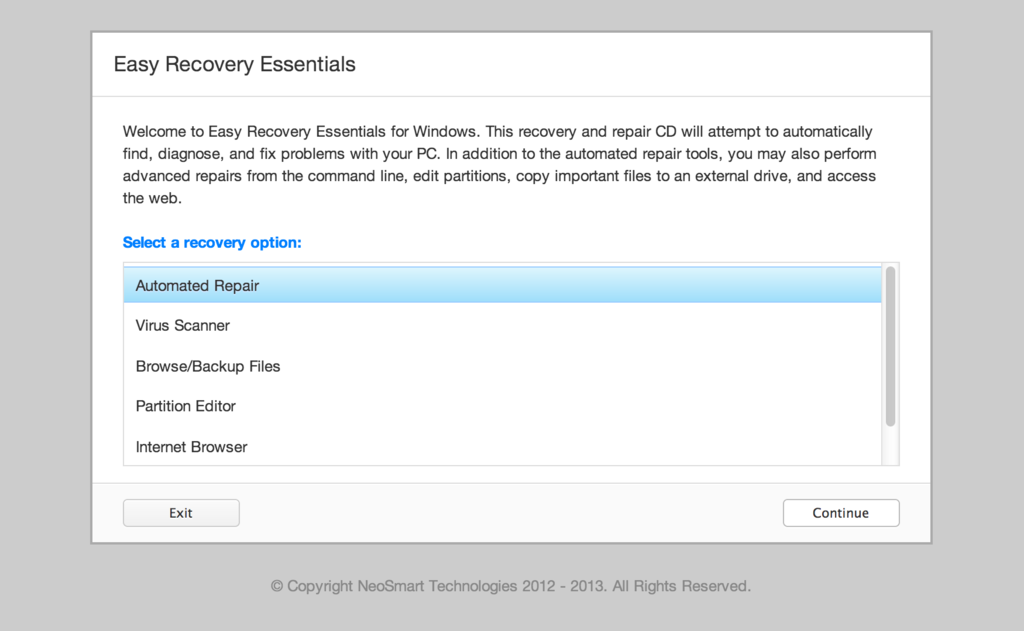
Our recovery disk supports x86 and x64 platforms and all Microsoft Windows 7 editions, including 32-bit and 64-bit editions: Ultimate, Enterprise, Professional, Home Premium, Home Basic and Starter.
Easy Recovery Essentials (or EasyRE), is a 55 to 135 MiB ISO image ready to be downloaded.
You can burn this ISO image to any CDs, DVDs or USB drives and boot from it to recover or repair your broken computer. We provided instructions on how to do this below, see Burn to CD, DVD or USB.
With the Easy Recovery Essentials you can (see list of features here):
- Automatically find and fix errors using Automated Repair
- Recover your PC from infections using its built-in antivirus
- Restore your PC to a working state
- Access and backup your most important data (like documents, pictures, music, videos and so on)
Easy Recovery Essentials comes with powerful tools that computer technicians or IT experts can use straight away:
- Fully-featured visual partition editor
- Scriptable command line
- Advanced recovery options
- Web browser
You can read more about EasyRE for computer repair professionals here.
What is a recovery and repair disk
 Major PC manufacturers no longer give customers a real Windows 7 installation DVD along with their purchase of a computer.
A Windows 7 installation DVD can be used to recover your PC, not just install a Windows 7 copy. The DVD has a “recovery center” that gives you options to Automated Recovery (attempts to fix automatically any errors found), System Restore (restores your computer to the last working state) or you can access a command-line for advanced recovery options.
Instead, customers are expected to create a recovery media themselves – on a CD, DVD or USB drive.
Your computer’s hard drive might have a recovery partition added by the manufacturer, but what happens when your PC or Windows isn’t working or you’ve lost the disks you had?
If you can’t boot into Windows or your PC isn’t working, only a bootable recovery and repair CD/DVD/USB can save you.
Download recovery disk for Windows 7
Easy Recovery Essentials, our recovery and repair disk, uses a non-destructive repair process that can recover your PC without formatting your hard drive or reinstalling Windows.
It comes with our powerful Automated Repair feature, an antivirus scanner built-in, the ability to access System Restore, tools to browse the Internet (a web browser) and back-up your most important files (documents, videos, pictures, music and so on), memory diagnostics and a command-line tools for advanced options.
Some of its features include (see list of features here):
- One-click Windows repair
- System Restore
- Web browser
- File backup
- Antivirus scanner
- Partition editor
Update: Please note that this disk is no longer free, due to licensing restrictions imposed upon us.
Download Easy Recovery Essentials for Windows 7
Our recovery disk supports x86 and x64 platforms and all Microsoft Windows 7 editions:
- Windows 7 Ultimate (32-bit and 64-bit editions)
- Windows 7 Enterprise (32-bit and 64-bit editions)
- Windows 7 Professional (32-bit and 64-bit editions)
- Windows 7 Home Premium (32-bit and 64-bit editions)
- Windows 7 Home Basic (32-bit and 64-bit editions)
- Windows 7 Starter (32-bit edition) (Starter is available only in 32-bit)
It works with any Windows 7 that has Service Packs installed:
- Windows 7 Service Pack 1 (SP1)
The disk is in ISO image format that you can burn to any CDs, DVDs or USB sticks and then use it as a bootable recovery CD/DVD/USB. We provided step-by-step instructions how to burn the ISO image below.
It’s a 120 MiB download file.
You cannot use a recovery or repair disk to install or reinstall Windows 7.
Burn to CD, DVD or USB
NeoSmart Technologies has published a guide on how to burn an ISO image to CD or DVD. This ISO image can be burnt to any CDs or DVDs and even USB drives.
You can burn the ISO with your favorite burning program. We published step-by-step instructions and guides on how to do this:
If you prefer to have a recovery USB instead, follow our guide on how to make a EasyRE recovery USB drive here.
Compatible with PC manufacturers
Our recovery and repair disk works with any desktop computers, workstations, laptops, notebooks, ultrabooks, netbooks or servers computers from all major PC manufacturers, Dell, Asus, IBM and more.
It works with older or no longer on the market PC brands, such as Gateway Computers or eMachines PCs.
Dell, HP
Dell recovery disk
This disk is compatible with Dell PCs and its manufactured series:
- Adamo
- Inspiron
- Studio
- Vostro
- XPS
- Latitude
Do you have a Dell computer running Windows 7? Read our recovery and restore guide for Dell.
HP recovery disk
Easy Recovery Essentials works with your HP computer, including any of these series and models:
- ENVY
- EliteBook
- Essential Home
- Pavilion
- x2 models
Do you have a HP computer running Windows 7? Read our recovery and restore guide for HP.
Asus, Acer
Asus recovery disk
It works with any Asus computer model that runs any of the following Windows versions:
- Windows 8
- Windows 7
- Windows Vista
- Windows XP
- Windows Server 2003, Server 2008 and Server 2012
Do you have an Asus computer running Windows 7? Read our recovery and restore guide for Asus.
Acer recovery disk
Acer users can download our disk. It’s compatible with all Acer models:
- Desktops models: Aspire M and T, Aspire X and Predator G
- Notebooks models: Aspire R, Aspire V3 and Aspire E
- Netbooks and ultra-thin computer models: Aspire S7, Aspire S5, Aspire S3, Aspire P, Aspire M, Aspire V7, Aspire V5
- Netbooks models: Aspire One
Do you have an Acer computer running Windows 7? Read our recovery and restore guide for Acer.
Lenovo, Toshiba, Samsung
Lenovo
Lenovo computers are supported by our disk, including any of the following series:
- Laptops models: ThinkPad and IdeaPad
- Desktops models: Thinkcentre and Ideacentre
Essentials series for laptops and desktop PCs are also supported.
Do you have a Lenovo computer running Windows 7? Read our recovery and restore guide for Lenovo.
Toshiba
The disk is compatible with any Toshiba computer model: Satellite, Qosmio, Portege, Tecra, Kira family series and All-in-One desktop series.
Do you have a Toshiba computer running Windows 7? Read our recovery and restore guide for Toshiba.
Samsung
Samsung users can download our disk. It is compatible with any Samsung laptops or desktops:
- ATIV Book, Gaming and Business PC series for laptops
- ATIV One for All-in-One desktops
IBM, Compaq, Gateway, eMachines
IBM
Lenovo acquired IBM’s personal computer division in 2005. You can download Easy Recovery Essentials if you own a IBM computer.
It is compatible with IBM desktops and laptops models, like the ThinkPad series.
Compaq
The Compaq company was acquired by HP in 2002.
It is compatible with Compaq notebooks and desktops, including the Compaq Presario series.
Gateway and eMachines
Gateway Computers was acquired by Acer in 2007. If you happen to have a Gateway computer, you can download our disk. It is compatible with its manufactured series:
- Series SX, DX and One ZX for desktop systems
- NE and NV series for notebooks
- LT series for netbooks
Do you have a Gateway computer running Windows 7? Read our recovery and restore guide for Gateway.
eMachines computers were available on sale until 2004 when Gateway Computers (above) brought the company. Gateway was acquired in 2007, but the eMachines brand was used until 2012.
If you own a computer from eMachines, you can download our disk as it is compatible with eMachines PCs.
Disk for Windows 8, Vista, XP or Server editions
Easy Recovery Essentials is compatible with other Windows versions, not just 7.
Windows 8
Read more about our recovery disk for Windows 8. It supports Windows 8 and its update, Windows 8.1.
Windows Vista
Read more about our recovery disk for Windows Vista. Easy Recovery Essentials supports all Windows Vista editions, from Vista Starter to Vista Ultimate, and the 32-bit and 64-bit versions.
Windows XP and Server 2003, 2008 and 2012
Windows XP is supported by Easy Recovery Essentials. This includes Service Packs of XP too: SP1, SP2, SP3.
Easy Recovery Essentials supports all Windows Server editions, such as Server 2003, Server 2008 and Server 2012 and the updated versions: Server 2003 R2, Server 2008 R2, Server 2012 R2.
Support
Easy Recovery Essentials supports all Service Packs (SP) of your Windows:
- Windows XP SP1, XP SP2, XP SP3
- Windows Vista SP1, Vista SP2
- Windows 7 SP1, 7 SP2
- Windows 8, 8.1
- Windows Server 2003 R2, Server 2008 R2, Server 2012 R2
Download Easy Recovery Essentials from here.
Please don’t ask for help below, it’ll get real cluttered real soon!
Open a support thread at https://neosmart.net/forums/ and we’ll help you resolve your problem ASAP.
Hi Ryan,
None of our software is free for us to make. This is all custom software developed in-house by our software developers and tested by our QA team designed to fix Windows computers. It’s not provided by Microsoft or by the manufacturers of your PC – it’s our solution to shortcomings on their part.
You can bet it has cost us considerably more than $20 to make this, and that it would cost a whole lot more than that in time and money for a computer professional to try fixing your PC.
Charging for our software lets us pay our researchers, developers, testers, and support professionals so we can continue to create software solutions that help our customers around the globe, and we thank you for supporting us.
My laptop was not windows 10 compatible and once windows 10 trial period ran out and I could not return to windows 7 it turned out the bios and drivers in my computer were not working in windows 10. All I get is a blue screen and a turning circle for hours and hours, but it never boots.
My system restore disk did not work.
Do you have a method to repair this with a restore disk for windos 7 pro
need window10 for my computer this is a joke
Still waiting on a refund. No support from neosmart.
@Mark: We’ve never received an email from you, and after your first comment here we sent you an email to the address you used – we did not hear back from ou.
I’ve sent numerous emails to you. You now have my email address so provide me a number to call vs a public forum.
Mark, our support system indicates that you’ve received and read (or at least opened) our emails to you trying to provide you with assistance (and we never received any emails from you whatsoever previously). (Please) email us at easyre@neosmart.net or just reply to one of our several emails to you so we can get the ball rolling with regards to helping you with the problem you’re having.
I have Windows 7 home Premium, recover disk from when I had my
e-machine, windows 7 home Premium it Crashed no getting it back (had for about 12 years,) Anyway I have borrowed a friend’s laptop Gateway/Vista/Windows 7 (?), Home Premium, it got a Blue Screen, got a message stating SOMTHING like
“Fatal System Failure” can I use these disk to fix the laptop problem, their are 4 disk support for e-machine & Acer, includes
System Disk, Recovery Disk part 1&2,
and a language Disk 64bit, both computers are 64 bit, PLEASE HELP,
BECAUSE I AM RESPONSIBLE FOR THEIR LAPTOP & NO MONEY, for the shop for them to fix it. I also have a Windows 7, Back up Disk For Windows 7 home premium, & 3 disk for Windows Recovery. Can I use any of these to fix any of these problems listed above. I only have a cell it’s an Android Citrine 5.1 ZTE 4G LTE,
Is their a way that I can donload to it then transfer to laptop.
If any of these will work HOW DO I PUT THEM in to laptop. Don’t know how if laptop does not stay on very long, I did have it to the point that it was stuck in “Windows Loading Files”
Thank you for your time, won’t do anything till I hear from You.
Hello there,
Well my goal was to do a clean format and reinstall windows to factory setting. I had done that before with the Windows 7 recovery disks that I burned when I first got my Asus laptop. But this time I could not find the recovery program, being fraustrated I tried to restore it using the F9 key, it wanted to restore by making a system image, and then it ended up overwriting the harddrive. Now windows will not boot at all. It goes to a black screen asking for media to boot.
Now the question is will your software help me? Also can I still format and reinstall windows to a clean state?
Sorry about the long post. Hope I get a reply and thank you!
Sina
Hello
I am unable to access my hd – want to recover and save the data. I have a win 7 home premium 64 bit clean install and formatted drive on a computer. Installed the failed drive to do windows repair and get message that “the version of system recovery is not compatible with the version of windows I am trying to repair” – ? Prior to all this when the drive was in the old computer – got error message “Partition repair – failed – error code 0x490”
Please help
@JP: it doesn’t sound like you’re using our recovery disc from this post? That error message is from the Windows setup DVD recovery tool. EasyRE will let you back your files up if they haven’t been totally lost.
apparently there’s an issue with going from Windows 7 to Windows 10. I installed 10 on my Toshiba laptop, worked fine for 2 months, then the black screen with blue square for password appeared. I also purchased a recovery disc to no avail I am told the only option is my main board needs replaced. Why do they do this??? Why are we not forewarned about this? Bill Gates, you are screwing the little guy! I want my $$$ back!
Windows update has damage werkernel.sys. The computer can’t read the installation disc.
Can I start and repair with the recovery downloaded to USB ?
The computer is updated from windows 7 to windows 10.
With kind regards
Tommy
I have a Compaq CQ57 I wanted to put an SSD. I did and could not run anything because no Windows. I used Easy RE 7. It was impossible to use a USB (maybe missing a driver) so I burned to a CD, THAT worked fine. However, NOW I have to get the drivers to even make the ethernet connect so I can update to a reasonable working system. I’m having trouble doing this.
I am at the HP web site and you can find a location with a bunch of drivers but I cannot find one to make the ethernet connection work!
Please advise. Thanks
Hi,
Can you please advise if you have a download for Windows 7 Ultimate 64 bit
Many thanks
David
Why not tell us how large the recovery file is for each paper system while ur at it…
So far not impressed with MS performance, Customer Service also sucks, so does their recovery steps when the Restore fails…..
(Another screw up by MS)…
@Frank the home edition ISOs are around 150MiB, give or take, while the professional edition ones weigh in at approximately 300MiB.
Sir i have lenovo thinkpad x220,unfortunatly thinkvantage blue button not working and i had found lenovo product recovery is missing from system recovery option.but still my win7 is running as well as updating daily, i need your help sir to get default lenovo product recovery setting…like this link is below.
https://pcsupport.lenovo.com/us/en/solutions/ht004960
Toshiba satellite C650 returned from family has no operating system can you supply recovery disk?
Hi,
I have run the Easy Recovery Essentials utility with USB and the following message poped up :
“Unable to find any valid windows partitions on this computer! Make sure all hard disks are attached. If they’ve been lost due to disk corruption, you can try to manually recover the partitions with testdisk a the command prompt”.
Don’t know what is the next step, need help?
Thanks,
Hi,
When I run the auto repair, theres a text line which says: ‘due to GPT partition issues this PC can only be booted in legacy/CSM mode. Is there anything I can do for this?
@Jonas: no, EasyRE automatically configures your system to be compatible with both legacy/CSM/MBR and EFI/GPT modes when and where possible. It’s OK though, you just need to make sure your UEFI option isn’t enabled in the BIOS.
It’s likely a case of https://neosmart.net/wiki/bootguard-4pp/
we just purchased and downloaded Acer repair disk for windows 7. Order # BA9BA8BA62216A1. Problem: downloaded file they are currupt. How can I download these files? Option, can you send them to me as an attachment to an email?
Corynne LaRitchie
Tengo una computadora sony vaio con windows 7, me marca windows error recovery, y no inicia el windows, tampoco me deja restaurar el windows con los discos de la pc. Quiero recuperar los archivos (imagenes, documentos, videos) que tenia en la computadora. El disco de recuperación que ustedes ofrecen me pueden ayudar con esto?
Hi, I have used the recovery disk and gotten my laptop to a screen that says ‘Easy Recovery Essentials – by NeoSmart Technologies’. How do I get back to my Windows 7 screen?
@Fernando: Yes, my friend. The EasyRE CD or USB will let you copy your documents, pictures, videos, etc. from your non-working PC to a USB stick or external drive. If you have a wired ethernet connection to the internet you may also be able to email them to yourself.
@Chokkau it sounds like you just need to remove the CD or USB from your PC and then restart.
I have your repair disk in the CD tray but the CD tray cannot be opened to remove the disc. How do I open the CD tray? It locked shut tight now.
@Chokkau: hit the eject button on your CD drive as soon as your PC turns on (when it shows the manufacturer logo or the BIOS POST details) – the CD should pop right out.
HI, the software always do this>
Testing system memory. Please be patient as this may take a while…
Checking disk & partition layout for errors…
Corrected duplicate disk signature on disk /dev/nvd0!
Corrected duplicate disk signature on disk /dev/nvd0!
Corrected duplicate disk signature on disk /dev/nvd0!
Corrected duplicate disk signature on disk /dev/nvd0!
Preparing to repair Windows partition on /dev/nvd0s2
Volume identified as NTFS
Due to issues with the GPT layout, this PC will only be bootable in legacy/CSM mode!
Testing disk health…
Checking boot partition on /dev/ada0s1 for errors and inconsistencies..
Integrity checks complete.
Checking Windows filesystem on /dev/nvd0s2 for errors and inconsistencies..
Integrity checks complete.
Searching for boot-related problems…
Rewriting the MBR on /dev/ada0
Rewriting the MBR on /dev/nvd0
Rebuilding the bootsector on /dev/ada0s1
Rebuilding the bootsector on /dev/nvd0s2
Determining the bootloader to be installed…
Starting installation of the BOOTMGR bootloader to /dev/ada0s1…
New bootloader installation successful.
Successfully reinstalled and reconfigured boot-related files.
Checking the registry for known issues..
Detected 0xC000021A BSOD, attempting repair!
Clearing temporary directories..
Automated repair complete. You can now eject the repair CD/USB, exit, and restart your PC
windows partition win7, on samsung nvme ssd.
but my pc wont start
Something happened to my PC. I can only start Windows 7 in Safe Mode. Can you help?
i just downloaded the tool into a USB stick but the compiter says that: “An operating system wasn´t found. Try disconnecting any drives that don´t contain an operating system” what shell I do? Thanks for the feedback.
Hi. Just woke up and you’re Easybcd utility was running. Don’t ask me, because I could not tell you how. But it was. And it’s relaying some kind of warning saying I must add an entry, or my system won’t boot.
Well ………………. okay, I guess that’s possible. Even though I was not there to see anything happen. However, tIhis machine is not BPT, but CHS (LBA actually). It uses the MBR system for booting. I checked the MBR, and everything looked okay. But is there an easy way to verify that nothing was damaged from your application running?
I grabbed this copy of easybcd for a quick eval, along with several other comparable applications. I’m building a major HTPC, and I don’t really want Windoze running on it. MS has done some strange stuff of late, and none of it is good. Now I suddenly have this ……………. rather strange ………………….. event on the machine I have all my research notes on, so I can’t turn it off until I am confident it will still boot.
Has MS caused many events like this recently that you know of? Because just two months ago Windows Update managed to run on another of my computers, despite it being totally disabled. Yes, it was disabled. I never allow that monster to run. I utilize some unorthodox configurations, and I do not need them dragging me back to la-la land. That other machine where update ran? It stripped away the drivers for the SMBUS, wireless WAN controller, the USB controller, and somehow managed to disable all three in the process. Had lots of joy fixing that one.
My email is timmullins23@gmail.com. If it isn’t too much trouble, I would appreciate your input on these issues. I recently picked up a Supermicro dual LGA 1366 motherboard to build that HTPC on, and I am completely unskilled at all things GPT. Of course all those primary partitions will come in handy, but I don’t think I want MS on any of them. I have a hunch update may have ran on this machine last night, and that’s how your utility (along with a plethora of other apps which were all open and waiting for me when I got up this morning). I hate unexplained events.
Thanx in advance.
Tim
Hello how can i obtain the original Windows 7 recovery media for a Toshiba Satellite S855-5254 i needs to reinstall windows 7 home in my computer thanks a lot really appreciate your comments
what happens if I buy your disc and it does not fix the problem?
windows 7 OS made on optiplex 960 refuses to boot and run on optiplex 7010
Why do you not sell to Puerto Rico?
@George: that was a bug caused by a recent update that removed US territories from the list. It’s been corrected.
I have an emachines vista computer. I want to reset complete like new. But I do not have the disk to add again the windows. Can you help me to download the program? I am not very knowledgeable on computers. I will need a lot of help. Thank you
I have your repair disk in the CD tray but the CD tray cannot be opened to remove the disc.