
 NeoSmart Technologies is pleased to announce the immediate availability of the latest additions to its Easy Recovery Essentials™ for Windows line of bootable repair and recovery tools for Microsoft Windows: EasyRE for Windows 11 and EasyRE Pro for Windows 11. Continuing a tradition that started with Windows 10, our Windows 11 boot recovery USB is currently available as a completely free download for anyone that needs to fix their Windows 11 installation after a virus infection or a Windows Update gone wrong.
EasyRE is fully compatible with the latest generation of EFI PCs and fixes everything from the original Windows 11 release to problems with the latest Windows 11 22H2 release and beyond.
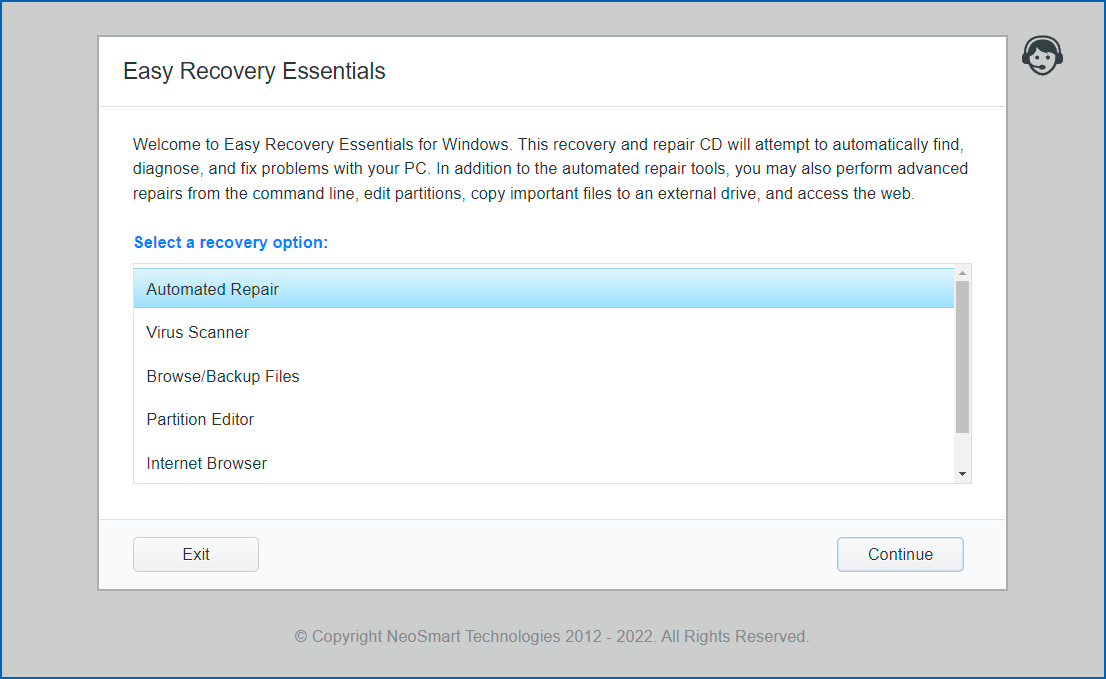
EasyRE for Windows 11 is probably the easiest and most reliable way to fix BCD boot errors, blue screens during Windows boot, startup errors, EFI bootloader problems, MBR issues and more. You can download EasyRE for Windows 11 for free today, and use it to create a bootable Windows repair USB with the free Easy USB Creator or create a free Windows recovery CD if you prefer that route instead. You just download EasyRE on any working PC, convert the ISO image download to a USB or CD with one of our free tools, then place it in the computer that needs repair and restart it, choosing to boot from the EasyRE CD or USB, and wait for it to load the main menu:
 Windows 11 is here and it comes with a new version of Segoe UI Emoji, the font that’s used across the OS to render various emoji from Unicode codepoint sequences to the emoji you see on screen (developers:

 It’s been a while since we