
We’ve all heard of (and, quite unfortunately, experienced) the infamous Blue Screen of Death. Some of us who tested the earlier Windows Vista beta builds had the unique experience of trying out the Red of Screen Death, which occurred when the bootloader experienced an un-handled exception (we experienced more than our fair share of these during the early days of EasyBCD development!). And then there’s Vista’s Purple Screen of Death, which few have seen.

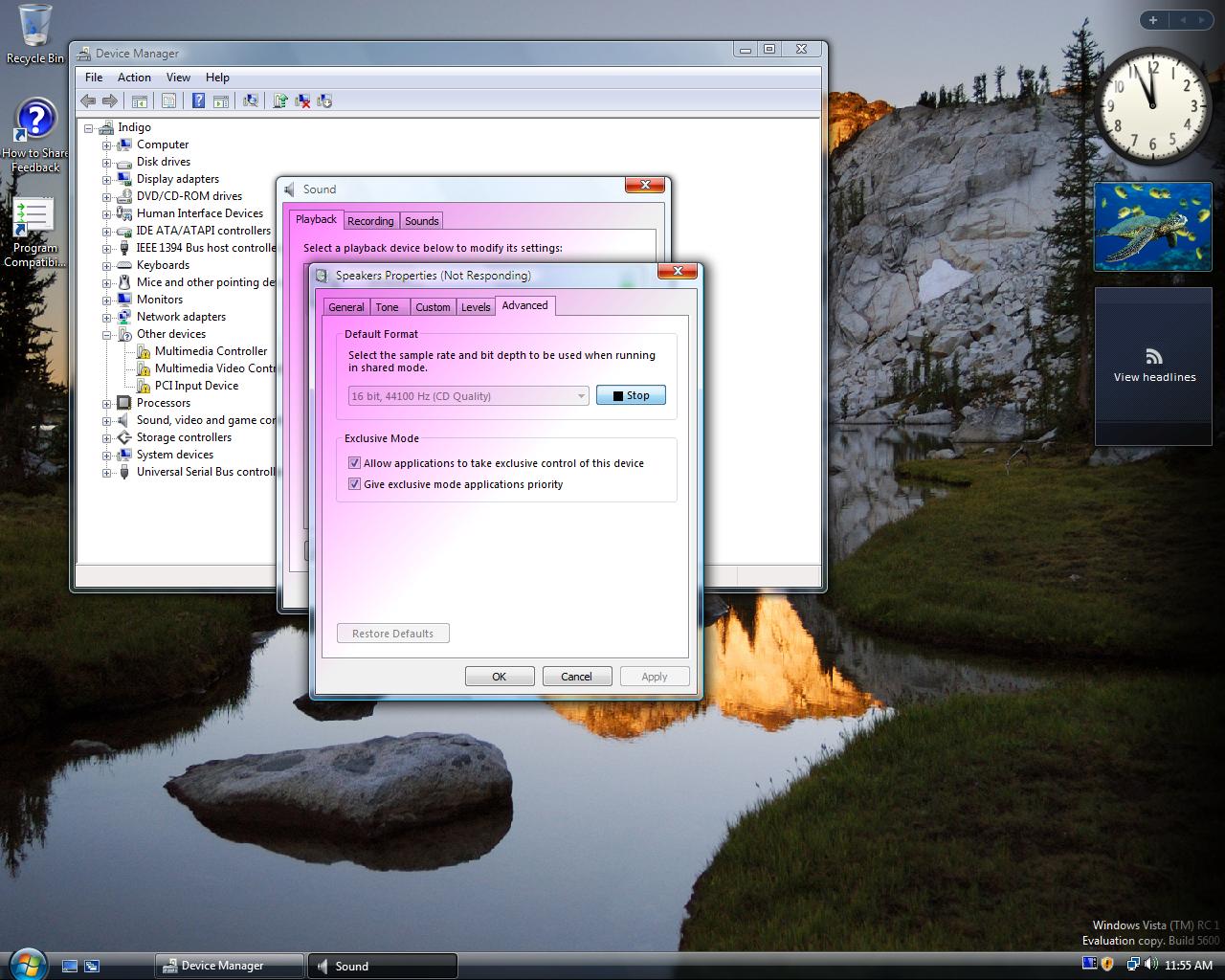
OK, perhaps it’s not a stereotypical “____ Screen of Death” in that it’s not a fatal error, it doesn’t make your computer restart, and it’s not as scary. But it’s still caused by a low-level problem in the kernel, and it does make you want to restart your PC.
When it happens: if your WDDM drivers partially crash, and DWM doesn’t properly deactivate. It’s very rare :)
Basically, when a window attempts to “gray out” because it’s unresponsive, the graphics drivers screw-up and paint it purple. Afterwards, all newly-opened windows will show the same purple tinting. We’ve seen this behavior on both ATi and nVidia machines, it’s something to do with the way the Windows Vista kernel handles a certain exception in the graphics driver subsystem.
You can see the full-size screenshot and many more in our extensive image gallery, in the Vista RTM album.
Wow, I have never seen that. That is a very unique problem with Windows Vista. This is just one of the reason’s why I don’t use Vista. If you restart your computer it fixes, correct?
Looks like the colour scheme used more than anything.
Why does it say RC1 Build 5600? Is this for the Beta and not RTM?
This screenshot was taking during the beta, but I experienced it twice on RTM during the early days when the graphics drivers will still in beta for both nVidia and ATi – I’m not by any way saying this is Vista’s faults though; because it’s 100% the bad graphics drivers to blame.
If you restart your computer it goes away…. but only updating to proper drivers removes it permenantly.
I saw this once, back when I was using the crap nVidia drivers before they went final; I think it was maybe a week or so after Vista went RTM, but I’m not sure…. It might have been the RC2 release (or Pre-RTM, isn’t that what the very last build before RTM was called?)
Creeped me out…. I mean, why purple of all colors!?
Does it happen with Intel drivers? I haven’t seen one with my PC at least.
I think (from what I understand from TFA) that any drivers that have WDDM support can “experienc” this PSOD, right?
But it doesn’t mean much to not have seen, thank god for that 😛
That is correct – to the best of my knowledge, it has to do with DWM, so you’d have to have an Intel chipset that supports the Aero interface before you’d ever see this. But it’s quite rare, so chances are, even with an ATi or nVidia, you’d have to try really hard to get it to show 🙂
Of course, those 276 usees of Windows Vista Toy (aka Home Basic) Edition don’t see this, either. But if you’re infested with Vista Toy, you’ve plenty of other problems anyway.
For the record, I saw this fairly often with early ATI drivers, never with Intel. (The only nVidia card I have access to is the Quadra FX 4500 in my Mac Pro, and I suspect that’s enough of a difference to make a difference here.)
I do look forward to Windows 8 and its new system-failure color combinations. Cerise, anyone? After all, fashions do need to be updated twice a decade or so, no?
It’s pink, not purple!
Jeff, Vista Home Basic also supports DWM, and it is enabled by default. The only difference between Home Basic and Home Premium is that Home Basic has had the “transparent frames” feature arbitrarily removed. They both have a composited desktop though, and both are capable of reproducing this bug.
What a non-story. But with all the Vista FUD going around, I am really not surprised. “lets find an obscure story – preferably negative towards Vista (it creates hits!) and publish it!”…
The Opinionated Blogger said ;”Wow, I have never seen that. That is a very unique problem with Windows Vista. This is just one of the reason’s why I don’t use Vista. If you restart your computer it fixes, correct?” (my emphasis)
How can this be one of the reasons why you are not using Vista when this is the first time you are seing it (on the 5600 build…)? How serious am I to take your posts?
As Computer Guru himself acknowledges in a reply; this is all down to faulty crappy drivers from either nvidia or ATI. Which in itself is impressive. Vista was delayed for an extra couple of months in order for hardware companies to tune their drivers. nvidia did not and Vista got accused….
@Jeremy, I stand corrected about the compositing. Thank you. That makes my observations a bit more interesting….but I also stand by the practice of calling any “operating system” that can’t do proper networking in this day and age as a “toy” (in lieu of more ‘colorful metaphors’).
@Ken: Not surprised about the video driver defects and the time it’s taking to shake them out, actually. Reliable sources inform me that, what with Digital Restrictions Mugging and other added complexities, there are more lines of code in ATI or nVidia Vista drivers than in Windows 95 – and we all know how perfect that was right out of the gate.
I just got this Purple screen on death with vista but with me it happens every time the login screen is about to appear, so i cant login to vista on my account now. If anyone has any ideas please reply. I just tried to install a new drive but it would read so i disconnected it. If that helps??
My bosses computer has the “purple screen of death” too! I need to fix it ASAP, or get the tech guy to do it if he can figure it out. She has a nvidia ge force go 6150 driver, and I love that Nvidia says that the driver must be installed from HP’s website. Don’t try to search for the driver using the model no, you have to search for the driver using the laptop model no. Well, I installed the newest nvidia graphics driver, nothing…I installed the newest windows update, nothing…i checked for any recent restore points that might have been created as the result of any updates, nothing…I’ve spent more time that usual googling, only to find the same goddamn article about this posted on 4+ different sites! I’m tired of reading about the problem and looking for a solution!!! If anyone out there has any great ideas, please help me out…support@sohpiearetta.com thanks all!!!
I have this purple/pink screen too and so sick and tired of this crappy Vista. If I had a copy of XP, I’d downgrade right now. Unfortunately, my piece of garbage Dell PC blew up (XP worked flawlessly on it) and replaced with this Vista garbage. Arrggh.
Any solution for this pink/purple thing? I’ve tried every Nvidea beta and certified driver with no fix.
Hi All, So my boss had the purple screen of death issue, or so I thought (see above). Talked to our IT guy, checked all the cables, b/c my bosses comp is plugged into docking station. So either the video cable to docking station, or docking cable to laptop was dirty, b/c I cleaned both in the typical nintendo style (the original one) and voila! No more purple screen!!
Gotta love IT guys… 🙂
I too have the pink screen of death, computer is new too, with vista. how do u fix?
My wife gave me her laptop with a pink scream of death on it. I traded it for my purple headed scream of ………….
I believe that this is the real and only solution for the Purple Screen of Death. It’s caused by a file nvlddmkm.sys that was not overwrite whenever you update your graphic card driver.
Here’s the link that will show you the step on how to solve the problem:
http://www.eggheadcafe.com/software/aspnet/29415832/display-driver-nvlddmkm-s.aspx
G’d luck and hope everything’s all right for you all.
Hi all, My pc got this purple/pink “Death” problem.
Every time i start a Game or anything else pretty Graphic/CPU/RAM taking shit,
my pc Screen goes Purple/pink in Scary ways!! I got no fucking ide why this happends.
And i really want this fixed, any ideas?
Well to help u help me I will tell u about my problem. First of all my Drivers are absoulutely Updated to latest Version so i dont think thats the problem, but
sometimes my screen goes away then comes back and says VideoCard Drivers has been stopped
and resetted.(or something like that) and under that it says /Nvlkdmn Driver(i belive)
First when i got this symptom, only WOW was affected everything else worked fine.
then wow and Wc3 then Counter Strike,then finally every game i had inclouding Battlfield 1942 & Battlfield 2.
Ive Been on many LAN parties so it wouldnt Supprice me if anything has gotten lose or broken inside this “Garbage Can” (Its NOT a Laptop) pretty new pc overall, 2ghz,2004gb RAM i think,Graphic Card Nvidia Geoforce 8400 GTS (or 8400 GT!! ) Have heard about Fan settings but where the hell do i check that ,found something about it in Setup when just starting my pc (Pressing F2 at startup) Please Help me!!
There’s a similar screen on the Nintendo DS Lite when it crashes, which only happens when you remove a game card or cartridge from the device while in Pictochat, I believe. It turns purple, and it definitely freaks people out.
Why would that error make you want to restart the computer?! 😀 Purple looks great in the windows!
I need answerrs right NOW.
my laptop is a windows vista and yestrday it was working compltely FINE!
today i turned it on.. its stattedd alright and once I logged intoo it said welcome and then a purple pinkk screen appeared!|I need to get this off and fix this computer. I ahve EXAMS mext weekkkk!
What i doooo ?? 🙁
Ok, i was playing a game on my computer for quite awhile, and then it had a warning about my ac adapter whcih i think is my battery for my dell inspiron 1525 then the screen just turned purple! i dont know whats wrong with it. whenever i log on the screen is purple…
I’ve been experiencing this PSOD for a the last few days when I turn on my computer. However, it goes away after a minute or so and I do not experience the purple shading of subsequent windows. In fact, I get no problems whatsoever after that.
All are wrong on the colours painted: It’s Magenta, not Pink or Purple.
Hey, I have a vista laptop Nvidia GeForce 8400M. And everything that’s white on the screen is purple/pink. Is that purple screen of death? And sometimes when I push down my hand hard on laptop it turns white again. Please help! This is really annoying! Thanks
I’m not getting this on Vista, I have XP AND it’s the whole screen turning purple AND I have to push the button in and do a Hard boot for it to stop! Just started doing this on the latest update driver for Nvidia! Does it at least once a day! I went back into the device manager and did a roll back. Hopefully this will STOP! Drives me crazy!