
(UPDATE: ToolTipFixer 1.0.1 released with fixes for some bugs)
Press Start | Programs; and right-click on “Accessories,” then press “Open.” Close the window that opens up, then go to your taskbar (next to the system clock) and hover over an icon, what do you see?
Ever since Microsoft invented the Windows Shell with explorer.exe back in the days of Windows 95, there’s been a bug that’s gone from one version of Windows to the next; and with each upgrade it became worse and worse – until Vista where it only rears its ugly head every once in a while instead.
Everyone that has used a Windows PC must have seen this bug before – it’s that ubiquitous (not that Microsoft would admit it for 10 long years):
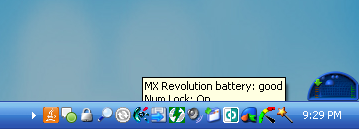
Windows has been plagued with this bug since 1994, and only in 2006 did Microsoft officially acknowledge its existence in Windows XP SP2 – where it recurred so often it was impossible to deny. But what did they have to say?
To resolve this issue, use one of the following methods:
• Log off and then log back on to the current account.
• Restart your computer.
Oh yeah, that’s easy…. Let’s just write down all the URIs to the tabs open in IE, save all our Word Documents, wait until we reach the next checkpoint in the game we’re playing, wait for that download to finish, then reboot…. Then wait for 5 minutes while loads up and spend another half-hour returning to where we were before we left off. How convenient!
To reproduce this bug… all you have to is open the start menu, right click an entry in the fly-out menu (like “Accessories” or “Photoshop”) and press “Open” – instead of single-clicking it – and your tooltips will be rendered useless!
Since Microsoft is obviously too busy to come up with a patch in 13 years, we decided to do what we can – and in a couple of hours we had a working patch that addresses this issue for once and for all, and it’s small, safe, fast, pain-free, and easy to remove.
< ?php include("http://neosmart.net/includes/chipin.php?type=wide"); ?>
Enter NeoSmart Technologies’ ToolTipFixer!! ToolTipFixer is our first patch for Windows to address issues that Microsoft should have answered long ago, and since this is version 1.0.0, it may very well have some bugs, but in 2 days of testing we haven’t had any issues with it whatsoever. If you find anything, please do let us know.
[documentation] [requirements] [support] [report bugs]
Now, does this look clean or what?!
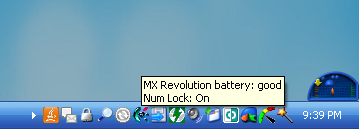
Erwin Ried has a similar solution as well here.
Very Kewl! Thanks
OMG! You’re my heroes for the month!
It really works!
20 years of agony!!!!! Gone!!!!!!!
THANK YOU!
This is pretty same as my solution published more than a year ago: http://erwin.ried.cl/?modo=visor&elemento=205
Hi Erwin,
Believe me, we Googled for a fix for quite a while before writing this – it’s too bad Google doesn’t search translated websites (why not? they have the capability).
May I ask, does your fix need to be run each and every time the problem is experienced?
Don’t worry. My solution runs as a service. Is not the optimal solution, is a bit lighter than yours (is in VB6 not .Net)
Greets from Chile
Our solution runs as a service in the background too!
It’s currently consuming 1.5MB of memory on my machine…
I’ll add a link to your fix in the article, good of you to drop by 🙂
Thanks, I will do the same in my page.
Hi,
Do you people thing you can change, or do ANYTHING to get rid of the tool tips for where you have pointed out (task bar mainly).
I have tried all of the following:
Thank You
Hey Ad,
You seem to have all the registry hacks covered….. Assuming what you’re trying to do is stop tooltips from showing in the first place, I can’t find any other registry changes to disable that behavior besides what you’ve already posted.
Have you restarted your PC?
Hi,
Lol ofc, I stopped explorer.exe in task manager and restarted it, so it picks up the new registr, (and restarted after doing this), but no luck. It must be hard coded.. in which case this service which has been made, can you make it do the oppisite?
We’ll take it into consideration, but no promises.
It seems others around the net are having the same issue as yourself. I’d guess that this hack used to work, once upon a long time ago with an older version of Windows XP.
http://www.flexbeta.net/forums/lofiversion/index.php/t4078.html
Thank You for your reply, still no luck..
http://msdn.microsoft.com/library/default.asp?url=/library/en-us/cpref/html/frlrfsystemwindowsformstooltipclasstopic.asp
looked hopeful, but yet again no luck. Thank you for your help. By the looks of it we’re all just going to have to put up with it. 🙁
Thanks Ad
I’m not sure why’d you want to get rid of tooltips in the first place though – there’s some info that can’t be had from anywhere else, and taskbar applications that can only be used by reading their tooltips…
Indeed you are right, but for example when running a game or visualtion, windowed and having multisampling enabled (on any setting) it kills the fps, when windows displays the tool tips..
you can try this by downloading winamp, finding the visulation addon called milkdrop (it might come with winamp now). then in the settings of milkdrop find mutlisampling and enable this to what ever you want on the windows settings. then okay and start the vis on window setting, while this is running hover your mouse over the startmenu, or the applications running so it displays the tooltips. did it work/not work?
bare in mind i have an ATI graphics card with the newest drivers and all, (i do not have the catalist drivers as they slow the frame rates, but just the drivers, with ati tools).
Ad
Hello Erwin, would you happen to have an English version of your toolbar fixer prog?
There is simple solution for this:
* switch off the computer, but wait until all become gray. DO NOT hit any buttons (switch off, hibernate,etc)
*hit “cancel”-the computer return his colour.
*hide the tollbar bellow, pulling it down. Make it again visible.
*now the tooltips are again visible at full height.
Voila… 🙂
Nice find Carrot. This worked for me. This is an acceptable workaround for me, but still should not be tolerated and Micro$oft needs to be smacked for allowing it to continue this long.
Hello Neosmart!
I’m wondering, since you developed a hack for tooltips, if there is a way to change the time tooltips are displayed in Windows XP?
I often find it hard to read texts in tooltips because they only show for about 3 seconds and then dissapear.
Then I have to move my mouse away and then back to see the tooltip again.
But this is irritating and I would rather like to set the time the tooltips in Windows will show so I will have time to read the tooltips.
Any ideas?
Best Regards
Olle Söderberg
Hey everyone, if you have a blog, please blog about this with a nice link back (like “fix hidden tooltips”) as sort of a positive google bomb.
This annoyed me for a long time and most places I looked kept saying there is nothing you can do about this. They still outrank this site for most searches, so that means lots of people aren’t finding this (I found it from a comment on one fo the sites that said there are no solutions).
So aside from a small chip-in, give Neosmart a boost by writing a short blog post with a nice link back to this app!
And, thanks – this was driving me nuts!
What an absolute gem! This irritating bug has been driving me nuts for as long as I’ve been using Windows. MS spends billions and cannot fix what I imagine is a minor code change. Thanks!
XP PRO SP2 current maint
Also if it’s useful to others… I “auto-hide the taskbar” and “keep the taskbar on top of other windows”. I found previous to your fix, the tooltip was behind the
taskbar. Previous to your fix, if I unchecked “keep the taskbar on top of other windows”, the tooltip displayed on top of the taskbar. However, this is NOT what I wanted. With your fix, the tooltip is now displayed on top of the taskbar with my desired settings : “auto-hide the taskbar” and “keep the taskbar on top of other windows”.
Found on net
nircmd a command line tool from Nir Sofer (very usefull!)
Run nircmd with following parameters:
nircmd win settopmost class “tooltips_class32” 1
http://www.nirsoft.net/
The new version of ToolTipFixer (see http://neosmart.net/blog/2008/tooltipfixer-2-released/) is the best of nircmd and TTF1.
For years I’ve been struggling with the tooltip mystery on a computer running Win2K. I’m still using this computer for development purposes, and need to see the tooltips. But, the damn tooltips just wouldn’t work. On rare occasions, they sometimes worked for a few moments, within some application. Then they disappeared again.
A year ago I found out that switching off the task bar’s auto-hide option made them work. That was a partial solution. Now finally I found that removing a certain application from the Windows Startup folder fully solved it …
The application was EColorific, a completely useless display color tuning tool. It had an icon in the taskbar icon tray. Once in a while it would pop up and tell me it was time to adjust my display colors … It came with the lcd monitor I’ve been using since 2003.
So that’s how long I must have had this tooltip misery!
Thank you, thank you, thank you, thank you!!!!!
Hi,
I have been trying to disable the tool tips completely for a while now. I have unchecked the box for ‘show pop-up description for folder and desktop items’. And I have done the binary route giving it the value of zero but the pop-ups do not go away. Will your patch allow me to disable them? I am using Windows 7.
Thank you for your time.