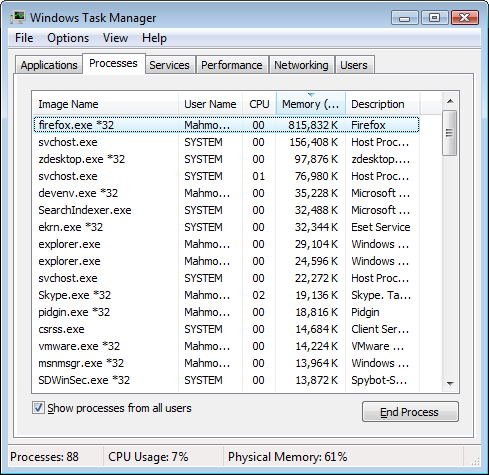
One of the biggest “improvements” that Mozilla claims has made its way into Firefox 3 is improved memory usage, in particular, the vanquishing of memory leaks:
Memory usage: Several new technologies work together to reduce the amount of memory used by Firefox 3 over a web browsing session. Memory cycles are broken and collected by an automated cycle collector, a new memory allocator reduces fragmentation, hundreds of leaks have been fixed, and caching strategies have been tuned.
We’re sorry to have to break it to you, but if you thought it was too good to be true you were right. Firefox still uses a lot of memory – way too much memory for a web browser.
We haven’t seen it reach 1GiB+ like we have with previous versions, but it’s quite normal for Firefox 3 to be sucking up ~300MiB of memory right off the bat, without a memory leak (the difference between memory leaks and normal memory abusage is that in a memory leak you’ll see the memory usage keep increasing the longer the browser is open/in-use).
This is a screenshot of Firefox’s memory usage after just a half hour or so with only a couple of HTML-only tabs open. This particular screenshot was taken on Linux where Firefox is using the shared GTK libraries – on our Windows PCs, it’s normal to find Firefox 3 taking up ~350MiB or so on both XP and Vista.
The sad thing is that isn’t caused by one of the memory leaks that plagued previous versions of Firefox. It’s Firefox 3 is supposed to take up that much memory – at least, that’s our assumption given how we’ve never seen it take up less.
Firefox 3 has a number of memory-hogging features added to the mix that are probably at least partially responsible for the absolutely gargantuan memory footprint. For example, Firefox now uses an SQL engine to keep track of your history and bookmarks, amongst other things. While that particular feature is powered by SQL-lite, which should – in theory – not take up too much memory, we’re at a loss to explain what else is wasting memory left, right, and center in the world’s most-popular open source web browser.
Things like full-text on-the-fly searching of the web cache for when you type text in the address bar certainly have an impact as well – that’s a lot of stuff to keep in memory at one time. But Opera 9.5 does the same with a lot less memory, so obviously Firefox 3 is doing something wrong.
It’s a shame that Firefox 3 is on the verge of a release and is so terribly unfit to run on any machine – Windows, Linux, or OS X – with less than at least a couple of gigabytes of memory.


FF3 runs perfectly on my system with 512MB ram with over 20 extensions installed. There are some sites that may cause a "memory leak" but I've rarely come across any. With 10-15 tabs open, my FF3 memory usage is 150-160MB at most and I haven't had a crash or anything unusual happen for week.
Perhaps you should also read http://blog.pavlov.net/2008/03/11/firefox-3-memory-usage/
I don't know how the benchmark in that link was conducted because no matter what I do I can't replicate their IE7 memory usages - for me it's always < 60MB.
FF3 reaches the ~300MiB mark without any extensions or anything.
Then I'd have to say there's something severely wrong with your system. I haven't even come close to 300MB on my other system with 1GB Ram with the same profile that my 512MB system is using unless it was a site that caused a memory leak. It starts off at 80-85MB and hovers at around 120-130 after it's been open for a while.
This is on 4 different machines, ranging from 2GB to 8GB of memory, and 3 different platforms (Windows XP, Windows Vista, and Linux).
I can't use Firefox 3 on a 3rd machine (an Asus Eee 900) because of its memory usage - freezes way too often; so I'm using Opera 9.5 instead.
The same Firefox 3 session that was posted above, a couple of hours later:
I also can't imagine how that's happening to you on Windows (for more apples-to-apples feedback, maybe stick with that platform) with no extensions in a half hour and not even browsing many pages. Are you sure this is a stock install? Makes no sense whatsoever. I really think the subject of the post should be in the form of a question and not a statement.
Also not making sense is how you're saying that Opera is so much better. I'm here to tell you that with a normal number of tabs (let's say 10-15, as opposed to the number you may be using), certainly by the end of a day's use, if not before, it will have busted through 200MB and once in a while 300MB on a 2GB RAM system. I've never not seen it do this. I'm speaking of the latest 9.5 beta, incidentally, not 9.2. Unlike FF, Opera very much doesn't like giving RAM no longer in use back, either, so it's pretty much up, up, up.
I'm using the RC1 version and with 3 tabs open it's using 84MB. I haven't noticed any strain on the system with it. It's been open for 5 hours.
Wow. Not sure what kind of tests you ran, but I have never seen that kind of memory leak with FF. Did you tweak something? I would surmise that you have either an abnormal installation/configuration with the browser, or some 3rd party tool/utility/malware, etc. that is screwing things up.
Hell, I can have a dozen or so tabs at once and have yet to see my system stressed like that....AND I run about 12 addons at the same time.
Just now, on crappy IBM work PC with only 512Mb of RAM, I have 12 tabs open and FF is at 92,764K memory usage...hardly stressful.
Of my FF3's, on ubuntu runs at 24MB and has been for the last 2 hours, my Win XP is at 100MB.
Doesn't seem to be troubling mine much.
Bit of a none story, me thinks.
Running FF3 beta 5 on Kubuntu, with FF running nearly 24/7, I average 145Mb memory usage. Seems obvious that your claim of it never bein under ~300Mb is patently wrong.
I'm running FF3B5 on WinXP Pro. I have two windows and a total of five tabs open, all of which are extremely content rich. I'm still only at 116MiB of memory usage out of my installed 2GiB.
Your results are extremely atypical and should not be considered indicative of a larger trend.
Nice job spreading FUD about one of the best browsers available.
RC2 is out: ftp://ftp.mozilla.org/pub/mozilla.org/firefox/releases/3.0rc2/win32/
@Steve: I think that's a good idea about a 3rd-party influencer. It sure would be interesting to know what that is.
@Rick: Yeah, I really would like to see a HijackThis log of what he is running when FF3 jumps to 300Mb. Should be an interesting read :)
Your claims are a bit excessive. I'm been using FF3 for around an hour now and it's only using 218Mb of RAM
ONLY 218Mb of RAM! I can't for the life of me think of another desktop application that needs so much memory
There is no FUD involved - and no spyware, the screenshot above was taken on Linux, guys!
Anyway, some screenshots from a quick test done on a brand, spanking new installation of Windows XP on a Virtual Machine w/ 2GB of memory.
Test involved opening 25 tabs in IE7 and Firefox and leaving them in the background for 3 hours or so.
Turns out IE7 does automated cleanup when it's minimized.
Task manager when they're both minimized 3 hours later: Firefox is 213MB, IE7 is 1.3MB (not a typo).
Task manager after maximizing both windows (3 hours later): Firefox is 212MB, IE7 is 27MB.
Bizarre. I will have to do some more checking to try to replicate your issue. However, can you try running your tests without devenv running? That can't have anything to do with it, but you never know. I wouldn't be surprised that an MS product (in this case Visual Studio) would interfere with a non-MS browser :)
Let's just say devenv isn't running on the Linux machine at least ;)
It's not possible for Visual Studio 2008 to interfere with Firefox's memory usage:
Unless, of course, Firefox is purposely searching for people running Visual Studio .NET and opening a memory leak just to piss off Windows developers, but I think we can safely rule out that option :)
Update: I now have ten content-rich tabs open in two windows. My Firefox instance has been running for just over three hours. I'm up to 132MiB of RAM usage, for comparison, my Outlook is currently using 77MiB of RAM.
Links to places that have found results quite dissimilar to the OP, but strangely similar to all of us that have been disagreeing in the comments: http://www.builderau.com.au/blogs/syslog/viewblogpost.htm?p=339270943 http://arstechnica.com/news.ars/post/20080317-firefox-3-goes-on-a-diet-eats-less-memory-than-ie-and-opera.html http://ejohn.org/blog/firefox-3-memory-use/
and of course, the Slashdot discussion of one of the above links: http://slashdot.org/article.pl?sid=08/03/18/0531241
Hi Mahmoud,
it should not be too difficult for you to post a batch file that would allow anybody to reproduce your results... Or at least the list of sites open for your test. It could be something like this:
firefox -url http://www.google.com -url http://www.ebay.com
This would allow developpers, and others to check what's going on.
Thanks in advance.
Reproducing the results should be pretty easy if we are given the list of URLs to load... firefox -url http://www.google.com -url http://www.ebay.com ...
Without this list, no-one can check those results. So will you please provide it? Thanks.
I just started Firefox 3.0 RC1 with 6 tabs and it's running at 178 megs of RAM and 168 megs in page. Usually after a few hours it swells up to 250+ megs of ram.
My test:
Middle-click the BBC News RSS feed so that all those URIs are loaded into Firefox tabs. Added to it http://neosmart.net/ , http://neosmart.net/blog/ , and http://neosmart.net/forums/
Mahmoud, your second example involved 25 tabs for 3 hours and 213MB, which sounds more realistic (and less than what Opera would be). Your first example involved a couple tabs for a half hour and 300MB. That's not really consistent even with yourself. What are you saying, that if you left the first example for another couple hours it would drop precipitously?
Are you on RC2 now?
Windows is now on RC2, Ubuntu is still on RC1.
I don't recall exactly how long Ubuntu's Firefox was running for, but it wasn't too long. I definitely opened a lot of tabs, but never more than 7 or 8 at once (open one, close one...)
Firefox simply isn't disposing of the memory it used. For instance, right now FF is using 308MB of memory (Ubuntu) and it's been on for a couple of hours at least, but only 4 tabs are currently open and, again, never more than 8 or so tabs ever open at once. No plugins. No rich media. Only AJAX is Gmail.
After similar browsing on Opera 9.5 weekly, memory usage was 101MB.
Hmmm...interesting issue. Truly. I wonder if it has to do with the specific pages you had opened? If you, say, open this http://neosmart.net/blog/2008/firefox-3-is-still-a-memory-hog/ page 12 times, does it do it as well?
I'm asking because not everyone is seeing this, but you are, and the only way we can trace it is to do the same test.
Well, with 40 tabs opened to BBC news pages and other pages, I only manage to get to 240MB in memory usage. This is on Windows XP, and Firefox has been running continuously for almost 5 hours. I see none of the memory resource issues that FF2 suffers from. most days FF2 crashes. It's one saving grace is that it always reloads what was being viewed. A great feature. FF3 looks like a big improvement overall.
I'm talking about 9.5 weekly as well. I've never seen it hold to 100MB with any kind of normal use. I typically use 10-15 pages and it's always above 200MB, usually reaching 300MB by the end of the day, and Opera doesn't give back more than a token amount if you're lucky.
Earlier, I understood your Ubuntu/300MB test involved very few tabs, but now you mention that you cycled through many different sites and had upwards of 7 or 8 open at once. That's a different impression.
What happens when you run it, leave it on the home page, and do nothing else with it? Let's start there as a baseline and then get into specific sites.
I do have vs2008 and xp sp3. I get around 200MB on ff3 after using it for couple hours. But initially ff3 starts around 80MB.
I am running Firefox 3 just fine on a 5 year old XP box with 1 gigabyte of RAM. It definitely appears to be something of a memory-intensive app but not nearly as bad as the previous version.
take a coredump of the process, and open a bug in bugzilla on the mozilla page, and stop spreading FUD.. it's possible that there is some system condition, homepage combination that you open, etc. A core file is the OS's raw view of the process and can show the chunks of native memory and which libraries are holding them. Follow an evidence-based, open source approach and stop whining.
Firefox is a pile of shit browser and the code is full of security holes and bugs.
As a developer, I'd note that there are many different definitions of "memory usage"; they're not all directly comparable. On Linux, you can see a bunch of them if you do "cat /proc//status" where is the process ID. (Look at the things that start with "Vm*".) On Windows, there are actually a whole bunch of different ones as well, and the one that Task Manager makes most prominent on XP and earlier actually isn't all that meaningful.
Probably what we need is a tool that can blame Mozilla memory use on the different Web pages that are open (or, in the case of leaks, were open) or on the browser UI itself.
Er, make that "/proc/PID/status" where PID is the process ID. (Using angle brackets clearly wasn't a good idea.)
I got to work at 9:30 or so this morning. Firefox 3 beta 5 has been running all day (it's just past 5 o'clock), enduring heavy use, with no fewer than five and as many as perhaps thirty tabs open simultaneously. I've got several extensions installed, including Firebug and Greasemonkey. Memory usage is now at 188 megs.
You're a big liar, I'm running Firefox 3 on Windows XP with 55 tabs & two Windows, it only takes ~170 Mb of RAM. Stop making fake screenshots, or stop testing an alpha version.
You're a big liar. I'm running Firefox 3 on Windows XP with 55 tabs, and it's only taking ~170 Mb of RAM. Stop making fake screenshots, or stop using an alpha version.
Dude,
Firefox is RC2, not alpha. And he's not lying because on this computer with 4 gigabytes of ram Firefox is using 320MB for only 12 tabs.
The 12 tabs are kind of heavy on the media though.
Though such comments should be taken with a YMMV tag, it's nice to see some people taking the issue seriously. In either Ff2 or Flock 114 (on a 1GiB system running XPSP3), visible memory usage does seem to be much higher than one would expect. Never really try to troubleshoot this but it does make Mozilla browsers much harder to use. Currently, with four media-light tabs open, Flock.exe is using over 400MiB of RAM. And it keeps growing as I type this (without opening anything else and without having anything happening in the background). To a number of people, Ff3's appeal has a lot to do with usability. If we expect performance to be much higher in terms of memory and get mixed results, chances are that widespread Ff adoption might suffer (despite the download day). So, it'd be really nice if we could identify the issue, even though some users have never had it. Is there any chance that the issue might have to do with a setting having to do with caching, session restoring, or opening page? Just a thought.
The same happens to me. In fact, the memory usage didn't reach the 200MB with FF2 so it was a shock to me when I found out. For me it happens when I'm downloading something big (300MB+), I think that the leak is in the built in download manager.. anyways, I'm hoping for Mozilla to solve all that before the final release.
Not reproducible here. Getting firefox 3 to eat more than 150 mb is not possible for me no matter how many hours have I been using the same session and no matter if i have 15 tabs with images, flash, etc, on them. Of course this is the nightly 32-bit version - the native 64 version included in ubuntu eats more memory. Right now I have this page opened and another at meneame.net, and it's only eating 66 MB..
ZDNet benchmarked all the browser and found that firefox 3 is the browser that eat less memory when having many tabs opened, better than opera, including betas. It's also the most fast, along with safari, in javascript benchmarks: http://www.zdnet.com.au/reviews/software/internet/soa/Browser-faceoff-IE-vs-Firefox-vs-Opera-vs-Safari/0,139023437,339289417-1,00.htm%22%22
here, i have 25 tabs (with embedded flash and pdfs included) for 6 hours, and it's using 95.6MB.
http://kronin.bla.cl/ff3rc2-memory-usage.png
Count me in the "quite disappointed" group. At the moment I have FF3 opened for about a day, three total tabs (in only one instance) and task manager is showing 208,688MB for the firefox process. And I've seen it worse. For me it just uses more memory over time, much like FF2. It could be the sites that I regularly visit, but it never seems to clean up the memory. My only plugins are Adbock Plus, Adblock Filterset.G Updater, and Foxmarks.
It's too bad, this is literally the only thing I was looking forward to in FF3.
Actually... Is there a good method to monitor Ff's memory usage, on a tab-by-tab basis? It might be nice to find which pages are causing issues. With about 12 tabs, Flock 1.2 (based on Ff2) was using over 600MB, last night, at the end of a relatively long session. After a restart, it's taking up 355MB. Haven't used Ff3 yet but it does sound like some issues might be remaining. Of course, these issues are difficult to reproduce, especially if they occur late in a session. But for Mozilla-based browsers to spread even further, these issues need to be completely ironed out. Haven't had similar issues in IE7 or Safari3.
@Alexandre, other than through trial and error I don't think so. I wouldn't worry about FF2's failings, as that's essentially EOL as of sometime in the next week or so. You'll be hard-pressed to find similar leaks in FF3, though that's not to say just the right page can't do it. FWIW, here's a much, much better test of browser memory than the article we're commenting on: http://blogs.zdnet.com/hardware/?p=2024
@Rick Thx for the Kingsley-Hughes piece. Looks good. As for Ff2 being EOLed, the reason it may remain relevant is that memory management is the main point of comparison. If at least some users are reporting a low increase in memory performance while updating from Ff2 to Ff3, it might mean that some of the memory problems occur in very specific contexts which haven't been taken into account during development of Ff3. IOW, it might have little to do with actual leaks and more to do with some specific pages or features that are only relevant to a subset of users. Given the fact that, for many of us, improvements in memory management is the main "selling point" for Ff3, solid evidence that Ff3 uses memory very efficiently in all situations would be very convincing. But I'll look at that ZDNet article more carefully. Maybe the problem, in my case, is 12" from the monitor.
Seems some others have similar problems: http://www.pcmech.com/article/firefox-3-hogs-memory-like-crazy/
550 MB of memory on FF3!?!
http://www.pcmech.com/wp-content/uploads/2008/06/2550486069-a5f7b7d29e.jpg
ok, Mahmoud... don't make us think you work for Big Bill, seeing that you favor IE7 over FF3 (and don't take me wrong, i'm using Vista and loving it), i wish i could send you a screenshot of FF3 on my laptop, 10+ tabs open and it NEVER gets above 75MB of memory usage, and i'm online more than 6 hours in a single day...
there's GOT to be something seriously wrong with your machines. sorry.
BTW, i use XP and SuSE on a triple boot configuration together with Vista, no problems with FF3 in any of the systems..
thank you.
Rafael, all of my posts were made from Firefox 3 on Ubuntu - this one too. I love Firefox, I just wish it were better :)
Ok, so I just checked mine, running Vista with . I have had this open since I got home at 10. It is now nearly 4. 6 hours. I have learned that there is no memory leak. But my system has 4 GB of ram. Firefox flucuates between 175,000 and 200,000 KB. I have 15 tabs open, 2 going to deviantArt (many pictures on each page), one going to a movie site, two going to email, and the rest to various websites that many people would visit. I do check my processes often, but I have never found the memory usage to be more than 200,000 KB. As I open up a 16th tab to watch a show that is about 21 minutes in length, and after letting it sit, it levels out at 185,000 KB, jumping up when I type to a a max of 204,000 KB. In the past, I have used firefox with over 30 tabs open at a time (When I counted it was 36. That was after I closed many of them) and checked the memory usage and have never found it to go much past 250,000.
Please note that this is not a detailed study and I have not been looking at the task manager for every time that I have opened firefox. This is just what I have seen and how it acts for me.
I will agree that firefox does have many areas of improvement and allowing users to be able to determine how much of their ram is used would be a good one, but I see two things about this.
One thing is, that the people who buy the 512 MB computers are usually the ones who do not go out and download firefox because they like it. They use IE because it is there. If one of those people does decide to use firefox, they tend to be patient and let their computer lag. The second is that a memory usage on a modern computer ranges from 1 GB to 8 GB. Looking at brand new Dell Laptops shows me that the least amount of memory you can buy in a laptop is 1 GB. To hit 150 MB with a single program is a decent hit, but all that it does for the user is make it so they have to close their browser before playing a game.
I agree that it would be nice if it was smaller, but the way I see it is that changing how much memory it uses, for power users, will not do much. If there were lite versions that could come along to go with small distros like puppy or people with older computers, that would probably be more efficient than to try to shave off little bits here and there. If there was a way to cut down on the memory usage without taking out too many things that are important or helpful I would say go for it, but I like what FF3 has to offer and will accept its power requirements.
FWIW, I do not believe the memory leak that I've observed would necessarily manifest itself very clearly in the span of 6 hours. For me, a common use case would be as follows:
Browser starts at some point during work day On and off browsing throughout the day Leave computer on (locked, but running) and go home Come in the next morning to a very slow running computer, with FF take hundreds of megs of RAM
It's much worse when this happens over the weekend. With FF2 it was not uncommon for me to see 800 megs of RAM being eaten by FF2 after a weekend. FF3 seems a little better from a "leak" perspective, but it still takes entirely too much RAM and I have still sometimes noticed a gradual increase over time, but not as consistently as with FF2. Here I type on my laptop (2 gigs of RAM total) with 4 tabs open and FF3 is using about 180 megs of RAM. Way too much IMO.
Just a few pointers:
XP, Linux, OSX and Vista's task managers all report RAM usage by processes in different ways, so apple to apple comparisons really aren't possible or meaningful.
Throw away half your physical RAM (or launch a lot of RAM-hungry apps together) and watch as the RAM usage of the processes magically decreases, as bigger parts of them have to be swapped to disk. Program using ram when it's available is not a bug. Empty RAM is no good.
If relaunching FF every 12 hours is too much of a problem, methinks somebody's protesting too much anyway.
Just for the record, FF3 is quite the stellar release. Kudos to the team.
For the true speed freaks or people on slow machines, this guy here has awesome optimized builds of the Mozilla apps - I happily use his FF build.
http://www1.plala.or.jp/tete009/en-US/software.html
"If relaunching FF every 12 hours is too much of a problem, methinks somebody's protesting too much anyway."
Wow. So, in your opinion this should be expected for a browser that's trying to capture IE's market share and is releasing a major version primarily focused on memory improvements? Yikes. If it's to be expected then perhaps they should document it.
By the way, my FF3 has been up for over a day and I'm at 289 megs.
@Aaron Good point. If restarting the browser every so often is expected, just document this point. In fact, it'd be very useful for Firefox to have clear documentation about user-side memory management. It'd be especially useful to pinpoint which pages/tabs take the most memory. Even better would be a warning of the "you may need to close this tab if you want to maintain performance." Even if it really is the user's fault, the fact that Ff may become sluggish under certain specific conditions can severely affect the user's perception of Ff. Not saying that another browser is better. But if you put yourselves in the shoes of a newbie, a sluggish browser can be a very frustrating experience. It might well be that this user should be careful about which sites should remain opened in different tabs at which point, whatever the browser. No matter. The more the user's Ff experience can be qualified as pleasant overall, the more likely this user is to get other people on Ff. In other words, we're talking about a campaign of seduction, not an engineering feat. User problems are problems too.
I'm running Firefox 3 RC2 with 12 tabs open and I've only got 134.21484 MB reading on 1024MB RAM. Yeah, I need more RAM. System is Dell Dimension 8200 Win XP ~1.864 GHz.
The memory is used for the Cache. Every modern Application use as much as possible, that's not always a bad sign. The memory get released if another application request it, there's not much to worry.
@Aaron Bad point. FF3 has much more then a better memory management. The speed & momory issues are just the most noticeable for end users. Thats why everyone talk about it.
@Mahmoud Al-Qudsi
I like to add ...if your Machines have 2GB to 8GB of memory - 300 MB is nothing! As more you have as more get taken. That's why memory usage is much lower on a 512MB System.
If you like a fast System why are you using the Gnome crap?! Because you are using Debian? Thats even more worse! Keep in mind the useless (too much simplified) Nautilus take already 60 MB. Compare this with the complex tasks of a Web Browser. Think about several 1000 Images/Files are loaded if u open lots of Tabs.
@Werner
Then I suppose you should break that news to Mozilla Europe president Tristan Nitot, who focuses on the memory enhancements whenever interviewed on the subject of Firefox 3.
I'm not defending the memory usage of other applications, simply pointing out where Firefox still has more work to do. My point is, so long as the Firefox development team is focusing on improvements to memory usage and management in version 3, it's probably a good idea to get it right this time instead of having to release v4 with "focuses on memory improvement," etc.
I didn't buy 4GB of RAM so developers could use that as an excuse to improperly GC, I bought it so I could run multiple VMs at once and play high-end 3D games.
I've been using Firefox since it's early days, but I become less and less comfortable with each update. I just tried Firefox 3 and it's horrible. Horrible, horrible, horrible. I DON'T WANT a window that covers half the screen when I check typed URLs, I DO WANT it to work with my current add-ons. I don't want my "web experience enhancing" with bloatware, I JUST WANT TO BROWSE THE WEB FFS ! Mozilla are turning into Mcrosft.
@Kevin McAspurn
So don't update anymore! Keep Firefox 1.
@Kevin McAspurn:
"...that covers half the screen when I check typed URLs..."
Huh? What do you mean by that? Sorry, but not sure what the complaint is. It isn't FFs fault your addons don't work. Time to get the addon creator(s) to update their...well...addons...
He's referring to the new smart bar that takes up a lot of screen real-estate when it displays all URIs that have content matching the (partial) words you entered in the address bar.
@Mahmoud: ah...ok...wondered what he meant.
To fix that, go to http://www.pcmech.com/article/firefox-3-disable-the-smart-location-bar-sort-of/
In summary: use about:config and change browser.urlbar.matchOnlyTyped to true AND browser.urlbar.maxRichResults to 1 (then it will act like FF2x).
For the record, Ff3 does seem to have (as promised) much better memory management than Ff2. In fact, the notifying the user of possible slowdowns is quite a useful feature and may have a positive impact on basic usage patterns. It would still be very useful if users could monitor their memory usage more precisely, tab by tab. We all understand that opening too many tabs/pages at the same time may result in a drop in performance under certain circumstances. But some of us might need a better way to prevent such situations. Especially since so many pages are media-heavy, these days. And since open tabs can be a way to manage lists of "things to read and/or blog about." In terms of features... Because memory management was the main improvement to be touted, I didn't really expect some of the new features. Bulk bookmarking and tagging is a step toward Flock, it seems. Kind of neat. Some add-ons still need to be updated but several of them still work. Overall, Firefox seems more usable than before, which should be a good thing in terms of widespread adoption. The main app needs to have consistent performance. Bells and whistles can be provided by add-ons.
I am running the version released yesterday in Vista, with 10 tabs open (including this one :P). The RAM use is < 80MB and the working set is < 100MB.
Please try to understand that I don't want these "enhancements". I don't want my web browser to sing, dance, and make me a cup of tea. I do want an efficient, stable program that can be configured the way I like it, with as few bells and whistles as necessary. The "Smart Bar" contained all my bookmarks. Why ? I already have them !, and for a dumb machine to try to guess what I intend to type is frankly insulting. Neither am I enamoured by someone adding features that I don't want, and will never use, but which will get in my way every time I use the program. Maybe I'm still browsing the web in an old-fashioned way, (I've been online for a VERY long time now) but that's my business, and it's the way I like it. Either way, it took me just a few minutes to dislike FF3 intensely, it's been uninstalled, and it's not going back.
@Kevin...
So download the two Addons: Hide Unvisited and Old Location Bar....simple. Then it's done.
I think your arguments are specious and if you bothered to look up solutions for your issue, you would get this working the way you want.
You know you can disable the "awesome" bar or revert it back to how it used to work so that you can still benefit from the other features. If you've been using the internet for a long time you can figure it out. There are extensions to do it or about:config changes, don't give in so easily.
@Steve... No, I won't add more stuff to something that (IMHO) has already become bloatware, and it's not an argument, it's my personal opinion, to which I'm entitled. As for getting it working how I want, it won't accept the add-ons that I already have and like, so no chance there then. I don't accept that if it's Firefox, and it's new, then it must be good. FF3 doesn't do it for me. Time to move on.
You're right, you are most certainly entitled to your own opinion. However, keep in mind that using a plugin to disable a feature is, technically, no different than using a plugin to add a missing feature.
"However, keep in mind that using a plugin to disable a feature is, technically, no different than using a plugin to add a missing feature."
Not necessarily true. Depends if that disabled feature is still using system resources in the background, in which case there's arguably a very big difference.
I've got similar issues. FF3 takes up around 250MB of RAM and CPU usage hovering around 85%. When I try to close it, the window closes but its still running in the background. I never had any issues like this with FF2
Did someone read comparisons with other Browsers? I think its a fact the memory management got a huge improvement compared with old FF2. Its not more worse but even better then any other decent Browser. I have a old PC switch tabs took sometimes ~10 seconds with FF2, this is past now. Whenever i feel something get slow its always Javascript related. Everyone use Google Analytics, Javascript Frameworks (sometimes several with plugins), the Web has changed a lot. Dont forget the extensions. I love Firebug but it can make some pages really slow. Replace the old Spidermonkey Javascript engine with something better should be the next logical step. It seems this get addressed for upcoming major releases.
About the Awesome Bar. I did hate it too. But i learned to use it the right way (several keywords) and the Awesome Bar get more smart as more you're using it. Using SQLite should make Firefox faster too. I know from my own experience SQLite is really fast and it takes much less resources then parsing XML Files.
My FF3 memory experience had been much worse than FF2. For me, FF2 would top out around 200MB but FF3 keeps going. Just this morning, I rebooted my machine. Within 1.5 hours, FF3 was consuming 1.2GB of memory! I have a ton of extensions but wasn't that one of the advantages of FF to begin with?
Well I made a search because it seemed to me that ff3 was spending too much memory in comparison to other programs( ff3 is taking 99.992 K). No other program is using that much, even Dreamweaver or Photoshop CS3.
I thought this was just my problem, but I see it is a ff3 problem.
FF3 just restarted after crashed while trying to load Yahoo mail 3 windows, 2 tabs each 280MB.. typical. In another hour of heavy surfing this will get up to over 300MB and I'll be forced to restart... again. While I loathe IE.. it usually maxes out at 100K with the same heavy surfing...
cheers!
Heh, I returned from a 5-day Independence day weekend to see my FF3 browser taking 1.1 gigabytes of RAM. I use netvibes a lot, and I think (though I'm not sure) that it has been open each time I see these ridiculous RAM usages. So it could be due to netvibes, but I do not believe a website should be capable of slowly increasing RAM usage to the point where it's using over a gig. I still blame this one on netvibes.
Right, I'm also having problems with FF3, memory usage isn't really an issue for me as I have 2GB availiable and with around 12 pages open I get between 150Mb & 220Mb of usage (dependant on the content of the sites). Whats troubling me more than anything is the way my laptop fan momentarily kicks in on FULL when I open firefox (around 5 seconds), then drops down to a constant half speed with 1 page open - and increasing for the duration of the session as I open more pages.... until it's at "jet engine" status... and the laptop feels like I could fry eggs on it (very handy for keeping your hands warm in the winter no doubt). CPU usage hovers around 25% when firefox is idle and jumps between 16% and 50% in use (AMD turion TL-60 2GB). I have tried a complete uninstall with EVERYTHING gone..reg keys etc etc and reinstall, but to no avail, also, I have no extensions installed and I'm running the latest release of FF3. If I use IE7 with 12, 15, 25 pages I get slightly lower memory usage than I do in FF and my laptop fan doesn't even break wind, totally silent, nada, nish, nowt, zip, zero! I cant stand that constant whirring sound. It's driving me doolally, especially as I love FF, uber fast and usable, but the noise just stops me from using it. Any ideas?
Opera 9.51. 4 windows open with a total of 45 (fourty five) tabs. 17 hours uptime. 89'356 Kb How can people say that 250-300 Mb from the very start with only 4 tabs is normal?!
I have IE on my PC for three reasons: 1. I like choice 2. It seems to play some internet radio/streaming sites that FF balks at 3. (pertinent to this discussion): For when I want to go for a quick drive and leave the gas guzzling uber-SUV at home....
But reading through these posts is also telling me that there are a lot of people who do not share my FF experience of a 200MB+ memory hit. So whay is it so sensitive to environment/sites/whatever?...that's a failing in my book and I'll keep reading, looking for some insight.
Also...for all those people who seem to tie plastic, metal and bytes to their sense of self...please turn off your PC sometime and spend a lazy evening reading Gulliver's Travels.
radiocam from the antipodes
It is a bit pathetic people stating "after an hour the memory usage is still xxx". Firefox 2 had problems after some 5 hours of heavy use and/or a couple of days it had been idle.
Aaron had a point above: after SEVERAL DAYS you really ARE in trouble. I am using FF in an Ajax development environment where it is DEFINITELY NOT a good thing to close the browser too often. However, due to the ongoing memory problems (and others) I still have to close FF at least once or twice a day. Total memory usage goes very quickly (in less than 4 hours) way too high and after that I experience the same problems (though milder) I had with FF2: high CPU usage and jerkiness.
Whatever the reason is the behaviour is far from acceptable. That said the situation is a lot better now. With FF2 one of our team members recorded a FF2 memory use of 2.4 GB after returning from his long weekend.
FF3's memory handling has been a disappointment to me. When I first installed it, it would optimize memory usage within a reasonably short time. Right now, all I have open are this page and Gmail and memory's still stuck solid at 200MB. The only extensions I have are DownThemAll, Skype, and Foxmarks...although Foxmarks is ridiculously bad on CPU usage, so I wouldn't be surprised if it was part of the problem, too. Still, this is a shame. Why should I bother even downloading the latest version on my other machines, particularly when I have to hassle with the "Awesome" Bar to keep it from keeping a history?
Ok, have been using FF3 since its official release, and have yet to see this memory issue. Not saying it isn't happening, just that the problems some of you are facing are not universal. Which begs the question, what is different here? I think we should start to focus on identifying common patterns between those that have this issue, and those that don't. Then see where the gap lies. Perhaps then we can determine the cause(s) of the memory issue.
Running FF 3.0.1 here on Mac OS 10.4.11 and Firefox is going over 300Mb of physical memory use and over 800Mb of virtual memory in about 2 hours of use (zimbra, gmail, and two or three other tabs of regular sites). I keep having to close and restart Firefox every two hours or so, or else it will get pretty sluggish.
One cause that I believe I have identified is the Netvibes site (which uses tons of Ajax/Javascript. If I leave that in an open tab for a couple of days then I see Firefox process usage in the several hundred megs. After a weekend it had actually topped one gigabyte of RAM usage (with one FF instance containing about 7 tabs).
Although this may be one of the causes, I don't believe it is acceptable. A web page should not be able to do this to a browser (and really to an OS) IMO.
Just noticed a couple of other weird things. I was reading a looong forum listing and to my horror I noticed that my old workhorse (P4 3.0 MHz, hyperthreading, 1.5GB, Vanta) was appallingly slow when I tried to scroll the page (lots of tables/rows/cells with images in the messages). I had to close the page and open it in IE7. No problems there. Once again we have the sluggish table behaviour, reminds me of the old 4.x Netscape.
Then another thing: I opened a couple of wikimedia images from a wiki page and moving the mouse over the image (800x600) made mouse VERY jerky and CPU usage jumped very high each time I moved the mouse. Once again no problems with IE. Then I tested the same pages using FF3 in a Sempron 2.8 with FX5500. No problems.
There seems to be a problem with FF and older graphics cards. I have noticed this several times before but now I did really proper testing and comparison with two other browsers (yes, Opera ran both of these test without problems as well).
I'm seeing the same thing, still using loads of memory. http://www.jpuddy.net/2008/07/20/firefox-3-vs-secure-certificates-and-authorities/
I often leave large amounts of tabs open in Firefox 3 for long periods of time and most recently found Firefox to not only be eating over 450MB of memory, but also chewing up over 80% CPU.
Oh my, Me going down the street and the "nice" neighbor hisses at me, and you going down the same street, and that neighbor smiles at you, that would mean, that something is wrong with me, right? All you FF jockies GET OFF IT!!
I don't use FF(Never will either), so memory loss here and there, it's gobbledigoog for me. Anyway, aren't these the same people(FF jockies) who once raved over IE?
5 tabs open, have been open for at least 14 hours, 10 extensions installed (not counting the 2 that aren't compatible with FF3 that I never got around to uninstalling after upgrading from FF2). 152 Megs of memory used. This is on 3.0.1.
Firefox 3 still a memory hog, Mahmoud Al-Qudsi still that stupid to waste everybody's time here. I am giving up reading your blog, pathetically wasting of time!
Are you getting payed by Microsoft to spread bad rumors my memory usage is now 115MB with 11 tabs open and its been that way for at least 6 hours
Since Firefox 3.0 release I have been plagued by "crashes" and reboots on XP. I have read other complaints about this problem also. It does seem to happen more often when starting to display a picture or a short video.
Do you think this is a memory problem for me? I only have 256 MB but probably need 1G. What do you think?
@Mahmoud Al-Qudsi: Did you ever find the cause of the issue. If I leave firefox open regardless of how many tabs are open, I swell to ~260MB w/in a few hours. It doesnt matter what extensions I have enabled, it seems like Firefox just swells and then stops at around ~260-~280. I never go above there though, unless FF freezes up.
-Nabil
It's caused by bad code, plain and simple.
Since using Windows more regularly (vs. Linux) I'm seeing much worse memory usage than before; with Firefox consistently above 300MiB for no good reason.
Firefox on Windows Vista x64 SP1 sucking up 550MiB of RAM after several hours of HTML pages:
I think the memory usage is partially depended on how large a page file you have. I hardly ever see Opera 9.52 use over 100 MB of ram. And when I plugged in a 2 GB SD card and used readyboost with it, my overall ram usage went down 4% and I have 2GB of ram on vista.
SwiftJun. 3rd, 2008 at 7:07 pm:
I havent seen 300 MIB but having just 3 tabs open it uses about 160 MB, which to me is pointing directly at the Code used in Fire Fox And my machine is clean as clean can be, so its not the machine but the code. I mean when FF came out originally back in 2004 it didnt use as much ram as it does today, i swear they are going down the Path that MS took when they Release new OS, Requires more ram, well MS is in a rut because Intel refuses to run it on their own corp machines.
Firefox 3 is way better than FF2, but there are definitely still memory leaks. I have to shut the browser down and restart a couple times a day as it becomes incredibly slow after a while, and task manager indicates memory use of 600-700 megabytes when it becomes noticeably slow.
That said I am using complex pages (e.g. facebook, gmail) but everything is always fine for a while, and the memory slowly creeps upwards over time. I don't have these pages open all the time either -- shutting down a tab does not restore the lost memory. I have to restart the whole browser.
Ok, Memory + Browsers + Lotsa Tabs = RamFeast. But why would ANYONE have 88 processes running during testing??? (see screenshot above) EVER!?! I have 18-22 at all times. Seems the people that publish this crap don't know their asus from their elbow.
I'm running 64-bit Firefox 3 on an Ubuntu Hardy box with 1 GB of RAM, and right after launch it's taking up 550mb of RAM. I have the Delicious and DownThemAll extensions running, though; I suppose Delicious could be doing it. I'll have to try removing it at some point (I could get away with a bookmark as I rarely use the sidebar.)