
If you have a bunch of old Java applications lying around in your Mac’s /Applications folder, chances are, you’ll come across this message box when you attempt to run them on Snow Leopard:
To open JavaApplicationStub, you need to install Rosetta. Would you like to install it now?
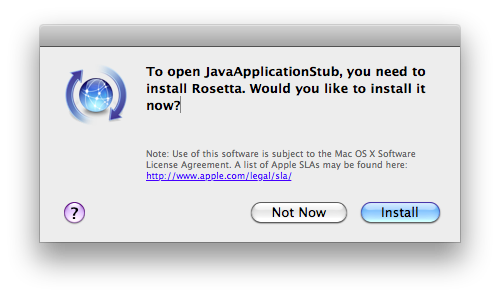
Personally, I try my best to avoid legacy Mac OS apps and haven’t found the need to install Rosetta on OS X 10.6 Snow Leopard as of yet. Whether you have need of Rosetta for your other applications or not, there’s no reason you should be running your Java-based applications through the Rosetta environment — they’ll run just fine on native Intel Java on OS X… with just a little bit of a prod in the right direction.
Java applications are CPU agnostic (hence the “write once, run everywhere” Java motto). The Java applets you download and use can theoretically be run on any PC machine that supports Java; be it Intel, PPC, ARM, SPARC, or more. The native Java virtual machine will translate the “Java bytecode” into the equivalent machine assembly that your PC uses and understands, and therefore, Java code written for legacy Mac OS should run just fine on Snow Leopard
If there’s no problem with running older Java applications on Snow Leopard, why am I seeing this dialog? you ask. Well, the problem isn’t with the Java application itself, rather it’s an issue with the Java loader, which as a tiny native Mac OS application that simply launches the Java virtual machine and points it to the JAR file that contains the Java applet in question. If you have an old Mac OS application, chances are, it’s shipping with a PPC version of the Java Stub Loader, and that’s what’s triggering Rosetta. The good news is, it’s easy to fix, since the latest Intel-based Java stub loader on Snow Leopard can run any of your old JAR files easy as pie.
- Open Finder, and browse (command+shift+G) to
/System/Library/Frameworks/JavaVM.framework/Resources/MacOS/
- Copy the file “JavaApplicationStub” to the clipboard (command+C)
- Now browse to the folder that contains the Java application in question.
- Right-click the Java application, and select “Show Package Contents” to view the actual app files in the OS X app bundle.
- Open the “Contents” subfolder, and then the “MacOS” folder.
- Paste the “JavaApplicationStub” file from the keyboard to here, and accept the overwrite prompt. You may need to enter your password when prompted as necessary.
- You’re done!
Sounds great, but the very first step failed: No MacOS exisits in /System/Library/Frameworks/JavaVM.framework/Resources.
How frustrating.
Thanks anyway.
Ian
Ian,
I think the default of Finder is to open with your user folder selected. If you select your Mac’s hardrive instead and run the search, “/System/Library/Frameworks/JavaVM.framework/Resources/MacOS/” will show up. (Or you can just navigate to it from there.)
Hope this helps =)
Thank you, Mahmoud Al-Qudsi, for the tip =)
Ian, if it’s failing you may need to first download and install the latest version of Java.
Eric, you are most welcome 🙂
-Mahmoud, Jordan
Thank you for the very useful information! Not only did it fix my problem but I learned some new tricks about Finder!
Macromedia Dreamweaver MX2004 does not open with SL. I tried this method but it failed. You write “paste JavaStubLoader to the MacOS folder of the application (MX2004 for me)”, but what I have copied from System is not JavaStubLoader but JavaApplicationStub, as you wrote! I am confused…!
And it does help, MX 2004 still pops out and then goes back to sleep. MX2004 does not open.
Sorry for asking for some more help.
Pierre, France
Thanks for tutorial.
It was quite annoying before.
When trying to insert a recordset using DW8 I get the error message
(while executing insert object in Recordset.htm, the following Java script error(s) occurred At line 40 of file “MacHD:applications:Macromediadreamweaver:8:configurationobjects:server:Recordset.js”:type error:
sbFileDOM.parentWindow.applyServerBehavior is not a function)
Im hoping this is a problem that can be fixed with your article?
I have identified JavaApplicationStub but not sure what to do with it.
I believe my dreamweaver 8 application is where the Java application is located but am unsure.
could you help??
George
This isn’t working for me either. I have .jar files that I need to open, and now I seem to have no way of opening them. When I go into the Info window in Finder, I can’t tell it to open with this JavaApplicationStub. It won’t let me. What app do I open .jar files with now?
Hi, I have a java app that uses libGL4JavaJauGljJNI14.jnilib but the jnilib is stuck in ppc mode, and i cant get this to work. I either need the libGL4JavaJauGljJNI14.jnilib to be compiled as x86, or need to run the whole program, including the jnilib in rosetta… any suggestions?
Thanks, but im still having problems with my computer, it is running so slow, any tips?
Mike
@Pierre: this only works for applications written in java. Dreamweaver was not written in java, so sadly, you have to either run it in rosetta or update to an intel native version.
@George Crozer: That appears to be a javascript error, not a java error. Despite the similar sounding names, javascript and java are wholly unrelated. Since it appears to be an error in the applications scripts, you might fix it by re-installing dreamweaver. If not, you should contact Adobe support.
I have a mac and it keeps telling me I need to download Java 1.6 to be able to use Limewire. It does not give me the option to download when I search the software update – can anyone help?
Emma:
Please get the latest Java directly from Apple’s Software Update in your computer.
If in doubt about this, please see this Mac article from Apple:
http://support.apple.com/kb/HT1338?viewlocale=en_US
This should definitely help. If you go to the Java site downloads section, you will find Java for all platforms… except for Apple Mac! (http://www.java.com:80/en/download/manual.jsp?locale=en&host=www.java.com:80)
great it works
Awesome. Thanks for the info! I have also been avoiding installing Rosetta. This fix helped with my install of Gallery Remote for gallery.sf.net. 🙂 Thanks!
You made my day 🙂
Thanks a lot, now I can use JabRef with my Mac again – without “slowing down” Rosetta…
Very useful. (There’s a typo on line 6 – you’re still working with the JavaApplicationStub, not with a JavaStubLoader. And if you’re a veteran Mac user just follow the path and duplicate the file, for goodness sake.)
One thing that I wondered was whether the modified Java app would still run on a PowerPC machine. The answer, to my suprise, is Yes.
David, thanks for catching that. Updated the post accordingly 🙂
Huzzah! Thanks!
How can I run application without copying JavaApplicationStub, if I have upgraded Mac.
Why not copy it?
Hi..
How can I run app without copying JavaApplicationStub from /System/Library/Frameworks/JavaVM.framework/Resources explicitly..If it possible the what changes I have to make?
If each time mac upgrade then I have to copy explicitly JavaApplicationStub..I have read that we can create symbolic link, what it is?
Natasha: No, you only need to do this once – the file from 10.6 will be compatible with 10.7, etc.
Neelam: Difficult. You can make a new package built off of symbolics links from the original package + symbolic links from the 10.6 java stub loader…. but why? Just copy the package and modify it – that’s easier 🙂
I can not ask my clients to copy JavaApplicationStub. I am distributing my application which is supported on Java5. Although my application is perfectly running on Mac (with jre6), if I run the jar directly. But I want my application be be launched by double click on Myapplication.app.
neelam, you can replace the stub loader in your application. There are no licensing issues – you’re currently shipping your app with an older version of the same file – just update it and redistribute.
Hi ,
How can I create a symbolic link and use in my java application to successfully launch on MAC.I do not want to copy stub file in java Application folder.
Thanks in advance
Rajkumari
Hi. I’m having a hard time finding the Java application file (i’m a new mac user). How do i find that?
/Mathias
Worked great, many thanks for publishing this!
Such an easy workaround makes GanttProject launch like a charm without Rosetta on 10.6.8.
Thanks Mahmoud !
I upgrade my Mac Pro to Snow Leopard 10.6.8 and now Corel Painter 9.1 crash. What can I do?