
If you want to use Windows Vista and you want to be able to print to a network printer, you’re going to have to use UAC. You turned it off? Turn it back on. You’re using the in-built “Administrator” account? Log-out and log-in as a normal admin. Microsoft says you have to use UAC to get a printer installed. If you don’t, you get this ugly message:
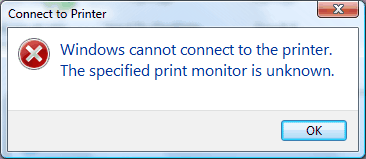
“Windows cannot connect to the printer. The specified print monitor is unknown.”
Exactly why this message shows up isn’t clear, it has nothing to do with the printer you choose to use or the process you take. This particular message is displayed when trying to add a printer via the wizard:
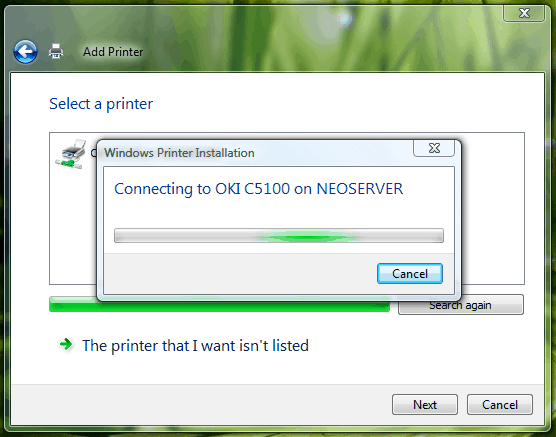
The only workaround available to date is to re-enable UAC, restart the PC, add the printer, go through the UAC prompts, disable UAC, and then restart once more. Damn!
There’s a less elegant approach available that saves you a lot of steps if you’re not the kind of guy that prints too often:
- Open the network share to the remote computer that has the printer installed.
- Browse to the printer.
- Drag the printer to the desktop with the right-mouse button, and select “Create shortcut.”
- Drag the document you want to print to the shortcut on your desktop.
- Rinse and repeat.
Another bug that got past the extensive RTM testing process? Nope. It’s a bug that came into existence during the finalization process. This bug wasn’t there in RC2, but it’s most definitely there now. All we can say is, hopefully this gets patched before SP6.
Update: A Solution
- In Vista PC’s go to “Control Panel” – “Printers” – “Add printer”.
- Believe or not, click “Add a local printer” (I know you want to add a network printer but that way it doesn’t work).
- Click “Create a new port” – “Local Port” – “Next”
- In the next box you have to enter a port name like this: \\PC name\Printer name where “PC name” is the network name of the XP PC where you have the printer and “Printer name” the network name of that printer. Be careful with this names – you can double-check by viewing the PC in “Network Places.”
- Finish the wizard and enjoy your UAC-free network printing!
Solution thanks to Galin Iliev
How odd. It should at least tell you that “UAC needs to be turned on” to work.
This only applies to network printers, right? Not local printers connected directly to a pc??? If so, your title is a little misleading.
Lupus: Yes, only network printers. The title may be a bit off, but the article is rather clear. You can’t exactly fit every single detail into the title, can you?
Same problem to me, too. But how can you turn the UAC and why does it has anything to do with the printer installation? That`s very strange.
Exactly, it’s a bug. But Microsoft probably will say it’s a “feature.”
Wow, thanks a bunch for this post. I spent a few hours on Friday troubling over a few computers on our network that were having this problem, and couldn’t for the life of me figure out the reason. It was especially annoying as anytime I viewed the installed printers, I wasn’t able to remove the network printer before the spooler service would crash out again. Annoying, but hopefully a fix will be coming soon.
What a great turnaround descibed under “Update: A Solution“. Thanks a lot!!!
It not only helps adding prints but also changing printing preferences which was not acessible even with UAC On.
Another way to work around the UAC issue is to install the printer as a local TCP/IP device (you must specify the IP address of the printer this will create a Standard TCP printer port). Vista will commicate directly with the printer (by-passing the print server) and auto detect which drivers to install without the annoying “print monitor” message.
Thanks for the tip, Joe 🙂
Thanks!!! It worked great. I just had to have the print drivers available locally vs. being installed from the domain print server.
Microsoft have now fixedthis bug, and doesn’t require to re-enable UAC. it isn’t because they force you it is because it was a bug in vista, vista has so many bugs that need to be sorted, i’m staying with XP for a few more years untill everythings soughted
hope it helps!
Hmm.. would the author care to enlighten us as to what “UAC” means? The solution is not much more descriptive than Microsoft’s original error message.
User Account Control, the new feature in Windows Vista that prompts administrators to verify that they want to perform each priveliged action.
More info @ http://en.wikipedia.org/wiki/User_Account_Control
Dam: Microsoft didn’t fix the bug. Seeing it now on Windows Vista SP1.
To add a little more weirdness to this little episode, I have had my printers neworked to my Vista machine from my elderly XP laptop for some time. I have had UAC turned off since early days on my Vista machine after I found that it was more trouble than it was worth. Bought a new Vista laptop a few days ago, and with UAC turned on on the laptop, I networked the printers to it and all was well. Then, after experiencing UAC on the laptop for awhile I decided it wasn’t so bad after all, so turned it back on on the host computer. The printers immediately stopped working and I was unable to reinstall them using any method, as they were invisible to the laptop. Then turned off the UAC on the host computer and was able to reinstall the printers without difficulty. The UAC is now off on the host computer and on on the networked laptop and all is well. You figure it out!
Personally I?m not a very big fan of Windows Vista. Every time I try to install something on my Windows Vista there is always going to be a problem with something. Finally, I have found some great and useful information for adding a printer.