Download our recovery and repair disk for Microsoft Windows 7 (also available for Windows 8, Vista, XP or Server editions) that can be used to access system restore tools.
It comes with our exclusive Automated Repair feature, option to access System Restore, tools to backup and recover your most important files, a built-in antivirus scanner and a command-line for advanced recovery options.
Download recovery disk for Windows 7
Looking for recovery disks for other Windows versions?
Contents
- What is a recovery and repair disk
- Download recovery disk for Windows 7
- Burn to CD, DVD or USB
- Compatible with PC manufacturers
- Dell, HP
- Asus, Acer
- Lenovo, Toshiba, Samsung
- IBM, Compaq, Gateway, eMachines
- Disk for Windows 8, Vista, XP or Server editions
- Support
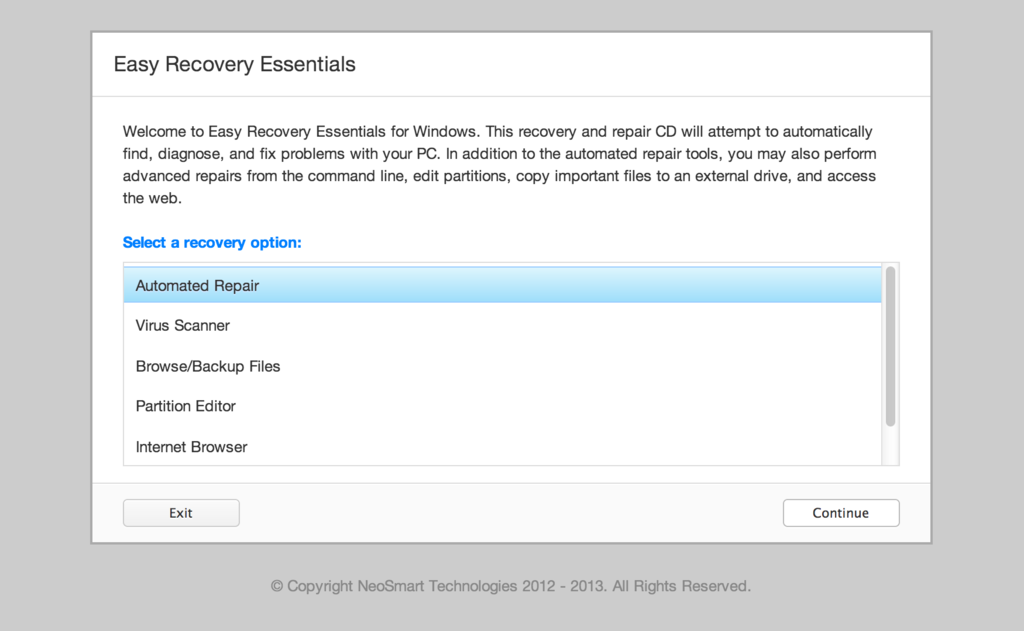
Our recovery disk supports x86 and x64 platforms and all Microsoft Windows 7 editions, including 32-bit and 64-bit editions: Ultimate, Enterprise, Professional, Home Premium, Home Basic and Starter.
Easy Recovery Essentials (or EasyRE), is a 55 to 135 MiB ISO image ready to be downloaded.
You can burn this ISO image to any CDs, DVDs or USB drives and boot from it to recover or repair your broken computer. We provided instructions on how to do this below, see Burn to CD, DVD or USB.
With the Easy Recovery Essentials you can (see list of features here):
- Automatically find and fix errors using Automated Repair
- Recover your PC from infections using its built-in antivirus
- Restore your PC to a working state
- Access and backup your most important data (like documents, pictures, music, videos and so on)
Easy Recovery Essentials comes with powerful tools that computer technicians or IT experts can use straight away:
- Fully-featured visual partition editor
- Scriptable command line
- Advanced recovery options
- Web browser
You can read more about EasyRE for computer repair professionals here.
What is a recovery and repair disk
 Major PC manufacturers no longer give customers a real Windows 7 installation DVD along with their purchase of a computer.
A Windows 7 installation DVD can be used to recover your PC, not just install a Windows 7 copy. The DVD has a “recovery center” that gives you options to Automated Recovery (attempts to fix automatically any errors found), System Restore (restores your computer to the last working state) or you can access a command-line for advanced recovery options.
Instead, customers are expected to create a recovery media themselves – on a CD, DVD or USB drive.
Your computer’s hard drive might have a recovery partition added by the manufacturer, but what happens when your PC or Windows isn’t working or you’ve lost the disks you had?
If you can’t boot into Windows or your PC isn’t working, only a bootable recovery and repair CD/DVD/USB can save you.
Download recovery disk for Windows 7
Easy Recovery Essentials, our recovery and repair disk, uses a non-destructive repair process that can recover your PC without formatting your hard drive or reinstalling Windows.
It comes with our powerful Automated Repair feature, an antivirus scanner built-in, the ability to access System Restore, tools to browse the Internet (a web browser) and back-up your most important files (documents, videos, pictures, music and so on), memory diagnostics and a command-line tools for advanced options.
Some of its features include (see list of features here):
- One-click Windows repair
- System Restore
- Web browser
- File backup
- Antivirus scanner
- Partition editor
Update: Please note that this disk is no longer free, due to licensing restrictions imposed upon us.
Download Easy Recovery Essentials for Windows 7
Our recovery disk supports x86 and x64 platforms and all Microsoft Windows 7 editions:
- Windows 7 Ultimate (32-bit and 64-bit editions)
- Windows 7 Enterprise (32-bit and 64-bit editions)
- Windows 7 Professional (32-bit and 64-bit editions)
- Windows 7 Home Premium (32-bit and 64-bit editions)
- Windows 7 Home Basic (32-bit and 64-bit editions)
- Windows 7 Starter (32-bit edition) (Starter is available only in 32-bit)
It works with any Windows 7 that has Service Packs installed:
- Windows 7 Service Pack 1 (SP1)
The disk is in ISO image format that you can burn to any CDs, DVDs or USB sticks and then use it as a bootable recovery CD/DVD/USB. We provided step-by-step instructions how to burn the ISO image below.
It’s a 120 MiB download file.
You cannot use a recovery or repair disk to install or reinstall Windows 7.
Burn to CD, DVD or USB
NeoSmart Technologies has published a guide on how to burn an ISO image to CD or DVD. This ISO image can be burnt to any CDs or DVDs and even USB drives.
You can burn the ISO with your favorite burning program. We published step-by-step instructions and guides on how to do this:
If you prefer to have a recovery USB instead, follow our guide on how to make a EasyRE recovery USB drive here.
Compatible with PC manufacturers
Our recovery and repair disk works with any desktop computers, workstations, laptops, notebooks, ultrabooks, netbooks or servers computers from all major PC manufacturers, Dell, Asus, IBM and more.
It works with older or no longer on the market PC brands, such as Gateway Computers or eMachines PCs.
Dell, HP
Dell recovery disk
This disk is compatible with Dell PCs and its manufactured series:
- Adamo
- Inspiron
- Studio
- Vostro
- XPS
- Latitude
Do you have a Dell computer running Windows 7? Read our recovery and restore guide for Dell.
HP recovery disk
Easy Recovery Essentials works with your HP computer, including any of these series and models:
- ENVY
- EliteBook
- Essential Home
- Pavilion
- x2 models
Do you have a HP computer running Windows 7? Read our recovery and restore guide for HP.
Asus, Acer
Asus recovery disk
It works with any Asus computer model that runs any of the following Windows versions:
- Windows 8
- Windows 7
- Windows Vista
- Windows XP
- Windows Server 2003, Server 2008 and Server 2012
Do you have an Asus computer running Windows 7? Read our recovery and restore guide for Asus.
Acer recovery disk
Acer users can download our disk. It’s compatible with all Acer models:
- Desktops models: Aspire M and T, Aspire X and Predator G
- Notebooks models: Aspire R, Aspire V3 and Aspire E
- Netbooks and ultra-thin computer models: Aspire S7, Aspire S5, Aspire S3, Aspire P, Aspire M, Aspire V7, Aspire V5
- Netbooks models: Aspire One
Do you have an Acer computer running Windows 7? Read our recovery and restore guide for Acer.
Lenovo, Toshiba, Samsung
Lenovo
Lenovo computers are supported by our disk, including any of the following series:
- Laptops models: ThinkPad and IdeaPad
- Desktops models: Thinkcentre and Ideacentre
Essentials series for laptops and desktop PCs are also supported.
Do you have a Lenovo computer running Windows 7? Read our recovery and restore guide for Lenovo.
Toshiba
The disk is compatible with any Toshiba computer model: Satellite, Qosmio, Portege, Tecra, Kira family series and All-in-One desktop series.
Do you have a Toshiba computer running Windows 7? Read our recovery and restore guide for Toshiba.
Samsung
Samsung users can download our disk. It is compatible with any Samsung laptops or desktops:
- ATIV Book, Gaming and Business PC series for laptops
- ATIV One for All-in-One desktops
IBM, Compaq, Gateway, eMachines
IBM
Lenovo acquired IBM’s personal computer division in 2005. You can download Easy Recovery Essentials if you own a IBM computer.
It is compatible with IBM desktops and laptops models, like the ThinkPad series.
Compaq
The Compaq company was acquired by HP in 2002.
It is compatible with Compaq notebooks and desktops, including the Compaq Presario series.
Gateway and eMachines
Gateway Computers was acquired by Acer in 2007. If you happen to have a Gateway computer, you can download our disk. It is compatible with its manufactured series:
- Series SX, DX and One ZX for desktop systems
- NE and NV series for notebooks
- LT series for netbooks
Do you have a Gateway computer running Windows 7? Read our recovery and restore guide for Gateway.
eMachines computers were available on sale until 2004 when Gateway Computers (above) brought the company. Gateway was acquired in 2007, but the eMachines brand was used until 2012.
If you own a computer from eMachines, you can download our disk as it is compatible with eMachines PCs.
Disk for Windows 8, Vista, XP or Server editions
Easy Recovery Essentials is compatible with other Windows versions, not just 7.
Windows 8
Read more about our recovery disk for Windows 8. It supports Windows 8 and its update, Windows 8.1.
Download for Windows 8.
Windows Vista
Read more about our recovery disk for Windows Vista. Easy Recovery Essentials supports all Windows Vista editions, from Vista Starter to Vista Ultimate, and the 32-bit and 64-bit versions.
Download for Windows Vista.
Windows XP and Server 2003, 2008 and 2012
Windows XP is supported by Easy Recovery Essentials. This includes Service Packs of XP too: SP1, SP2, SP3.
Easy Recovery Essentials supports all Windows Server editions, such as Server 2003, Server 2008 and Server 2012 and the updated versions: Server 2003 R2, Server 2008 R2, Server 2012 R2.
Support
Easy Recovery Essentials supports all Service Packs (SP) of your Windows:
- Windows XP SP1, XP SP2, XP SP3
- Windows Vista SP1, Vista SP2
- Windows 7 SP1, 7 SP2
- Windows 8, 8.1
- Windows Server 2003 R2, Server 2008 R2, Server 2012 R2
Download Easy Recovery Essentials from here.
Please don’t ask for help below, it’ll get real cluttered real soon!
Open a support thread at https://neosmart.net/forums/ and we’ll help you resolve your problem ASAP.